Why Employee Resistance Is Quietly Killing AI CRM and AI SDR Rollouts

A lot of businesses assume that once they buy the right AI tool, adoption will take care of itself. In reality, one of the biggest reasons AI projects underperform is not the model, the workflow, or even the budget. It is employee resistance. In the original Solutions Review article, Akhil Verghese argues that many companies struggle with AI not because the technology lacks promise, but because the people expected to use it do not trust it, do not see how it helps them, or were introduced to it badly in the first place. Readers can see the full original article on Solutions Review. 

The article explains that resistance usually comes from three places. The first is simple resistance to change. Many teams would rather stay with a process they already know than risk disruption from a new system. The second is bad implementation: employees quickly lose confidence when the tool does not fit the real workflow or creates more cleanup work than value. The third is fear of replacement, especially in roles that are heavily task-based. That framework is especially relevant for companies exploring AI CRM, AI SDR, AI lead generation, and AI lead conversion systems, because these tools are often introduced directly into revenue workflows where trust, speed, and clarity matter most. 

One of the most practical insights from the article is that AI adoption should not start with abstract demos. It should start with real workflows. The recommended approach is to identify a few early adopters, have them document a specific task AI improves, and run live training sessions around that concrete use case. That matters in sales and customer operations because teams rarely buy into AI from vision alone. They buy in when they can see that an AI assistant saves time on CRM updates, improves lead qualification, drafts better follow-ups, or helps them respond faster without sacrificing judgment. For an AI SDR workflow, that could mean showing reps exactly how AI reduces manual research and prepares better outreach. For an AI CRM workflow, it could mean demonstrating how AI keeps records cleaner, follow-ups tighter, and pipeline actions more consistent. 

The article also makes an important business point: leaders need to define success before rollout. It gives an example using outbound sales metrics, emphasizing that managers should know current performance, current cost, what level of performance drop would be unacceptable, and what success would actually look like before deploying AI. That is the right lens for any company investing in AI lead generation or AI lead conversion. If you do not know your current close rate, lead response time, cost per booked meeting, or cost per qualified opportunity, then you cannot tell whether the AI is helping or simply creating the illusion of progress. This is where many AI sales rollouts go wrong: they optimize activity instead of revenue outcomes. 

Another strong takeaway is the warning against buying into vague “AI” promises. The article notes that many products are marketed as intelligent systems without being genuinely adapted to a company’s specific workflow, tools, or guardrail requirements. That is highly relevant in the market for AI CRM and AI SDR tools, where businesses are often sold generic automation that does not integrate cleanly, does not reflect internal sales logic, and cannot be trusted in production. Krazimo’s positioning fits naturally here: reliable AI for sales and lead workflows is not just about adding a model. It is about designing the workflow, enforcing controls, measuring outcomes, and making sure the system actually supports how teams work. 

The article further argues that useful AI systems should be launched in phases, not dumped into production all at once. The recommended pattern is to first run the AI in parallel with human staff, compare outputs, and only expand responsibility once the system proves it can reproduce competent work safely. It also stresses strong guardrails, such as limiting retries, escalating edge cases to humans, and requiring permission before any expensive or legally sensitive action. That phased-launch approach is especially important for AI lead conversion systems, where an agent might otherwise send the wrong message, mishandle a discount, or create inconsistent customer communication. In other words, the path to successful automation is closer to training a junior teammate than flipping on a piece of software. 

The piece also highlights something many companies underestimate: AI systems require maintenance. Prompts drift, policies change, source data changes, and workflows evolve. That is why monitoring is not optional. In a sales environment, a once-effective AI workflow can become harmful if the CRM schema changes, qualification logic shifts, or messaging standards move. This is one reason high-performing AI lead generation systems are usually tied to ongoing iteration rather than one-time deployment. The companies that see lasting value are the ones that keep tuning, auditing, and improving the system after launch. 

A final point from the article is that AI adoption can create opportunities for reskilling rather than simple replacement. It gives the example of customer service staff moving into sales-oriented roles. That is a useful framing for businesses worried about internal pushback. The most effective AI rollouts are not sold as “headcount elimination software.” They are introduced as a way to remove repetitive busywork so people can focus on higher-value work. In the context of AI CRM, AI SDR, and AI lead conversion, that means fewer hours lost to manual data entry, repetitive prospect research, scattered follow-ups, and inconsistent handoffs — and more time spent on closing, relationship management, and judgment-heavy work. 

The broader lesson is simple: businesses do not get value from AI just because they buy a product. They get value when they deploy the right workflow, prove it against real business metrics, train teams around practical use cases, and roll it out in a way that builds trust instead of fear. That is true across the board, but it is especially true for customer-facing systems. If a company wants AI CRM, AI SDR, AI lead generation, or AI lead conversion to work, it has to treat adoption as both a systems problem and a people problem. The technology matters, but so does the rollout.

Read the article at Solutions Review.

Ethical AI Automation: Where Human Judgment Still Matters (And Where It Doesn’t)

If you run a business right now, you feel it. AI is everywhere. Automation promises are everywhere. And you’re asking yourself the same question every other business owner is asking: am I behind — or am I about to make an expensive mistake?

Our CEO, Akhil Verghese, recently sat down with Stacy on The Authority Business Show to answer exactly that question. The conversation covered the practical reality of AI automation for business owners — not the hype, not the theoretical possibilities, but the actual steps you should take this week if you want to use AI without losing control of what matters most.

Here are the key takeaways.

AI Is Making Businesses Faster — Not Necessarily Smarter (Yet)

One of the first distinctions Akhil draws is between speed and intelligence. Right now, most productive AI solutions in the real world are focused on automating existing workflows — doing what already works, but doing it faster and more consistently. Very few businesses are using AI to generate genuinely new ideas or creative strategies. That’s still firmly in the domain of human leadership.

This matters because it shapes how you should think about your first AI investment. You’re not buying a replacement for your best strategic thinker. You’re buying a way to handle the repetitive, high-volume work that’s eating up your team’s time.

Before You Automate Anything: Two Steps You Can’t Skip

Akhil’s number one piece of advice for any business owner considering AI is deceptively simple: before you automate, evaluate and structure.

Step 1: Define your metrics. Take the specific workflow you want to automate — say, responding to leads from Instagram ads — and look at how it’s performing right now. What’s your conversion rate? What’s your average response time? What does success actually look like in numbers? Without this baseline, you’ll never know whether your AI is helping or hurting.

Step 2: Label your data and settings. Go through everything the AI would need access to and clearly mark what’s sensitive, what requires human permission to change, and what can be fully automated. You don’t want an AI agent issuing $1,000 refunds to angry customers or using your business credit card without oversight. These boundaries need to be hard-coded, not left to the AI’s judgment.

The Real-World Math: When AI Lead Conversion Makes Sense

Here’s where the conversation gets specific — and directly relevant if you’re running a service business.

Akhil shares a concrete example from a cosmetology practice (think med spas, Botox, aesthetic services). When someone clicks an Instagram ad for Botox and an AI agent responds within 60 seconds instead of the typical 30 minutes to 2 hours, the results are dramatic. Studies show response rates can increase by 20x to 50x when contact happens within a minute. For a business like a med spa in a competitive market, where a potential client has 20 other options within a few minutes, that speed difference translates directly into booked appointments and revenue.

But here’s the nuance: the same approach applied to a real estate company produced very different results. Why? Because someone looking at a multi-million dollar property is willing to wait two hours for a response. Speed matters enormously for low-consideration, high-competition services. It matters much less when the purchase decision is inherently slow.

The takeaway for service businesses: If you’re in an industry where response time is the competitive battleground — home services, med spas, legal consultations, any appointment-driven business — AI lead conversion is likely your highest-ROI first automation. If you’re selling something where customers naturally take their time, look elsewhere first.

The Biggest Red Flag: Falling for a Cool Demo

Akhil is blunt about the most common mistake he sees: businesses falling for impressive demonstrations that bear no resemblance to production-ready solutions.

The problem is structural. It’s incredibly easy to get 85-90% of the way to a working AI solution. But in many business contexts, 85% accuracy is effectively useless — because if you’re correcting things one in ten times, you need to be just as vigilant as if you were doing everything manually. And the consequences of confidently wrong AI output are often worse than no output at all.

The gap between a cool demo and a reliable, deployable agent is typically tens of thousands of dollars and months of careful work. On day one, you look 80% of the way there. Then it takes five months to reach the 96% accuracy threshold you actually need for production.

What AI Can’t Replace: Agency, Creativity, and Accountability

The conversation turns to something many business owners quietly worry about: what can’t AI do?

Akhil’s answer is clear. AI is exceptional once you know what needs to be done. It makes the process of getting there dramatically more efficient. But figuring out what to do — the strategic vision, the creative spark, the leadership decisions — that’s still entirely human territory. He has never had an AI, even with significant autonomy, independently identify a problem worth solving that he wasn’t already working on.

And on the accountability front: no computer can be held accountable for its decisions. Someone in your organization needs to own the outcomes of any automated process, and Akhil recommends that person be the manager of whoever was doing the task before — they’re the most incentivized to get it right, and they’re already accountable for results in that area.

The Three-Step Rule for Adopting AI

For business owners who want a simple framework, Akhil offers three steps:

1. Talk to your employees. The best automation ideas almost always come from the people doing the work. They’re already using AI in ways that might surprise you. Listen to them, involve them in the process, and let ideas bubble up from the bottom.

2. Evaluate before you deploy. Define what success looks like. Understand the current workflow in detail. Identify every point where things could go wrong. Then decide whether to build internally or hire external expertise.

3. Set guardrails, monitor continuously. Every AI deployment needs hard limits on what it can access and do. And those limits need to be monitored — not just for a few days after launch, but permanently. If your conversion rate drops below a threshold for three consecutive days, you need an automatic alert.

What Should You Do This Week?

If you’re a business owner listening to all of this and feeling overwhelmed, Akhil’s advice is simple: start small, but start now.

The companies that have already adopted AI and worked through the early mistakes are now seeing real, measurable upside — real revenue increases from real agents deployed in real workflows. The gap between them and companies that haven’t started is widening. The biggest mistake you can make right now isn’t deploying AI badly. It’s keeping your workforce AI-illiterate.

Pick one simple, repeatable workflow. Define what success looks like. Set clear guardrails. Deploy it. Monitor it. Learn from it. Everything else will follow.

Watch the full interview at: https://www.youtube.com/watch?v=pwcSPE0Rwz8

How Our AI CRM Gets People Their Botox

Client Overview

Dr. Jason Emer runs a high-demand aesthetic medicine practice in Beverly Hills, with patient engagement spanning web inquiries, phone calls, SMS, email campaigns, clinical visits, and a high-volume Instagram presence.

The practice needed to scale operations without losing the premium, high-touch experience that drives conversions and retention.

The Problem

The practice’s growth created predictable operational friction:

  • Communications were fragmented across Salesforce, phones, email, and Instagram, with no single source of truth.
  • Context was hard to recover (past calls, prior quotes, appointment history, clinical notes, consent status).
  • Inbound leads could slip through cracks, especially when response SLAs were missed.
  • Call recordings existed, but weren’t actionable without fast, structured transcription and summaries.
  • Instagram demand was overwhelming, with patient DMs often answered late or not at all.
  • Clinical and operational systems lived separately, limiting staff’s ability to act quickly and consistently.

Goals

  • Create a single operational cockpit for staff: leads, accounts, communications, scheduling, notes, consents, reporting, and analytics.
  • Make every conversation searchable and useful (calls, SMS, email, and social).
  • Reduce “lost lead” leakage with rules and monitoring.
  • Automate the front door of patient discovery (especially Instagram) while staying on-brand and safe.
  • Integrate cleanly with existing systems rather than forcing a rip-and-replace.

The Solution

We built two connected systems that work as one operating layer:

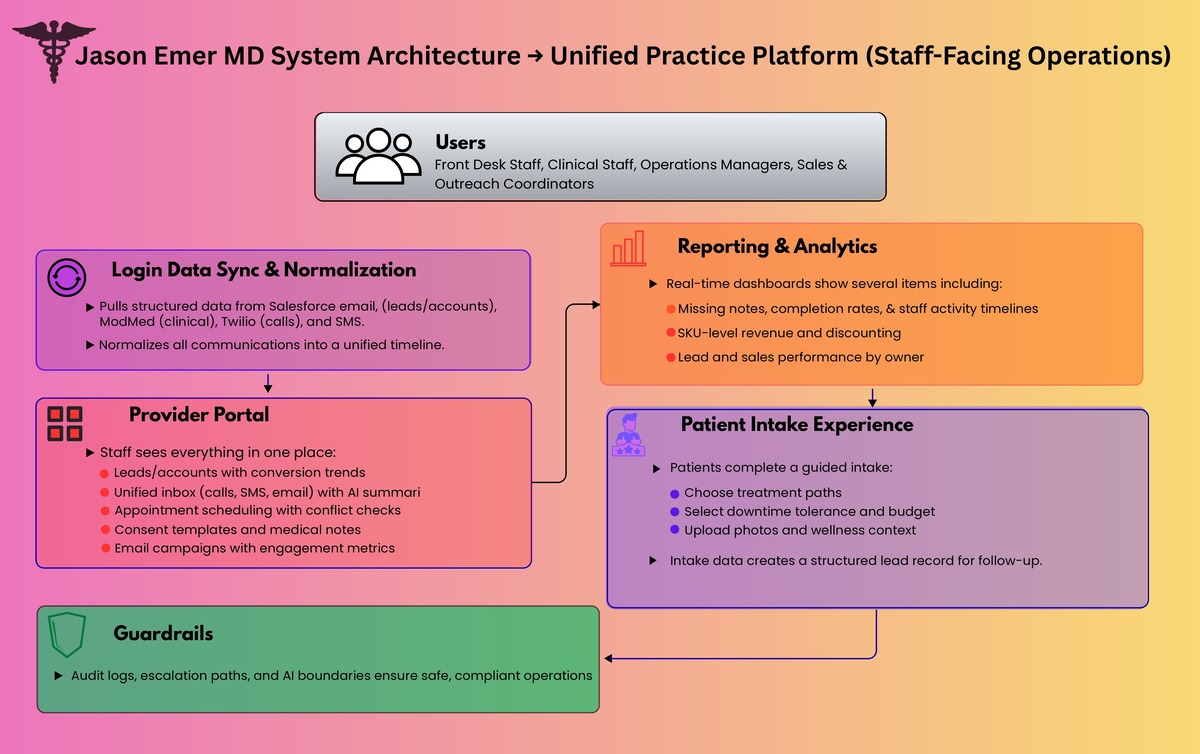
  1. Unified Practice Platform (Provider Portal + Patient Intake Experience)
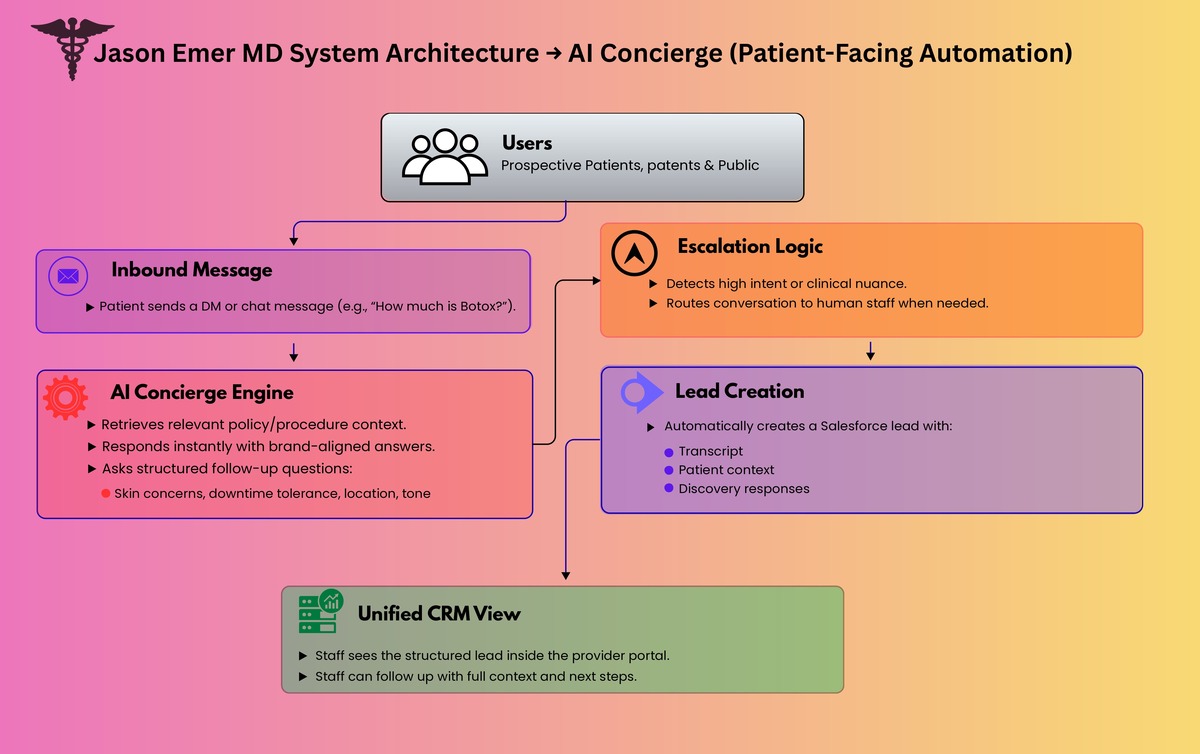
  2. AI Concierge for Instagram and Live Chat

Together, they turn inbound interest into structured intake, routed follow-ups, and measurable operational throughput.

medical CRM automated CRM practice management patient intake lead management clinic software healthcare CRM patient messaging appointment scheduling call transcription

Solution 1: Unified Practice Platform

What staff sees: one place to run the business

Leads + Accounts

  • Leads and converted accounts are pulled from Salesforce on a frequent sync cadence and shown in purpose-built views.
  • Team performance views show leads by owner, conversion rate trends, and top procedures.
  • A “no-cracks” layer highlights uncontacted leads in time windows (example: 3 to 12 hours) so managers can intervene.

Unified Communications Inbox

  • A single communications view aggregates:
    • SMS
    • calls
    • email history
  • Call history includes transcriptions and AI summaries so staff can read what happened instead of hunting through recordings.

Email Campaigns

  • Staff can run outreach directly from the portal with metrics like sends, opens, and replies.

Operations

  • Appointments: schedule and manage appointments with operational constraints (example: avoid same-day cross-city conflicts).
  • Consents: create reusable consent templates, assign them, and track completion.
  • Medical notes: surface patient notes and workflows around completion.
  • Appointment instructions: pre-built instruction templates per appointment type, sent ahead of visits.

Reporting and Risk Controls

  • A reports layer was built to answer urgent operational questions quickly (example: missing notes by time period, completion rates, and breakdowns by status and owner).

Revenue and Performance Analytics

  • A “single pane” analytics dashboard provides:
    • product and SKU-level performance
    • discounting and reason codes
    • activity timelines per staff member
    • lead and sales overviews by owner and time window
  • The point is not generic BI—it is clinic-specific decision surfaces.

What patients see: a guided intake experience

We built a guided, branded intake flow that captures structured data without feeling like a form dump:

  • Choose a “path” (two experiences)
  • Use an interactive body selector to identify focus areas
  • Select intensity and downtime tolerance
  • Provide key parameters (budget range, sensitivity, skin type)
  • Provide optional wellness context (if applicable)
  • Upload photos (front/back) for additional context
  • Submit details and create a lead record for follow-up


call summaries Instagram DMs Instagram automation AI concierge chat automation Salesforce integration ModMed integration Twilio integration unified inbox patient follow up lead tracking

Solution 2: AI Concierge for Instagram and Live Chat

Instagram is a top-of-funnel channel for modern aesthetic practices, but it is operationally brutal at scale. We built an AI concierge that can:

  • answer common questions instantly
  • guide patients through a structured discovery conversation
  • ask the right follow-up questions (skin concerns, downtime tolerance, skin tone, location, etc.)
  • stay aligned to the brand voice (premium, patient-first)
  • escalate to humans when intent is high or clinical nuance is needed
  • create Salesforce leads automatically when the patient asks to be contacted

This turns Instagram from “busy inbox” into a qualified lead pipeline with context.

Architecture Overview

You mentioned you already have an architecture diagram—this is the narrative that should sit next to it.

High-level design

1) Data + systems of record

  • Salesforce as the operational backbone for leads, accounts, quotes, ownership, and activity
  • ModMed (EHR) as the clinical system of record
  • Twilio (or equivalent) for telephony and call recording
  • ManyChat (or equivalent) as the Instagram gateway

2) Unified ingestion and normalization

  • Scheduled sync pulls new Salesforce and operational records into the portal
  • Communications events (calls, SMS, email) are normalized into a consistent timeline model
  • Clinical context is joined where appropriate to give staff a richer patient view

3) AI processing pipelines

  • Call pipeline: recording → transcription → speaker separation → summary → indexed to patient/activity
  • Chat pipeline: message → retrieve policy/procedure context → response generation → safe delivery → logged transcript → optional CRM lead creation

4) Presentation layer

  • Provider portal for operations and analytics
  • Patient intake experience that structures demand before it hits the team

5) Guardrails

  • Audit logs for every interaction
  • Clear boundaries on what the AI can and cannot claim
  • Escalation paths to staff when needed

Results and Impact

  • Minutes, not hours, to understand a call: transcriptions and summaries make phone conversations instantly actionable.
  • Sub-minute responses on high-volume social channels, converting attention into structured patient journeys instead of stalled DMs.
  • Reduced lead leakage via “uncontacted lead” rules and manager visibility by owner/team.
  • Operational clarity: appointments, consents, notes, instructions, and reporting centralized in one system.
  • Better decision-making: revenue, SKU performance, discounting, staff activity, and lead/sales trends visible in one place.

Why It Worked

This wasn’t “AI bolted onto a CRM.” It was an operating system approach:

  • unify the clinic’s reality (calls, texts, email, IG, scheduling, notes)
  • turn unstructured conversations into structured next actions
  • keep Salesforce/ModMed as systems of record while making them actually usable day-to-day
  • build automation where it removes toil, not where it introduces risk

Krazimo helped Dr. Jason Emer’s practice scale patient engagement without sacrificing the premium experience. By combining a unified operations platform with an AI concierge that can handle high-volume inbound demand, the practice gets faster response times, cleaner follow-ups, and clearer operational control—without ripping out existing systems.