How Our AI CRM Gets People Their Botox

Client Overview

Dr. Jason Emer runs a high-demand aesthetic medicine practice in Beverly Hills, with patient engagement spanning web inquiries, phone calls, SMS, email campaigns, clinical visits, and a high-volume Instagram presence.

The practice needed to scale operations without losing the premium, high-touch experience that drives conversions and retention.

The Problem

The practice’s growth created predictable operational friction:

  • Communications were fragmented across Salesforce, phones, email, and Instagram, with no single source of truth.
  • Context was hard to recover (past calls, prior quotes, appointment history, clinical notes, consent status).
  • Inbound leads could slip through cracks, especially when response SLAs were missed.
  • Call recordings existed, but weren’t actionable without fast, structured transcription and summaries.
  • Instagram demand was overwhelming, with patient DMs often answered late or not at all.
  • Clinical and operational systems lived separately, limiting staff’s ability to act quickly and consistently.

Goals

  • Create a single operational cockpit for staff: leads, accounts, communications, scheduling, notes, consents, reporting, and analytics.
  • Make every conversation searchable and useful (calls, SMS, email, and social).
  • Reduce “lost lead” leakage with rules and monitoring.
  • Automate the front door of patient discovery (especially Instagram) while staying on-brand and safe.
  • Integrate cleanly with existing systems rather than forcing a rip-and-replace.

The Solution

We built two connected systems that work as one operating layer:

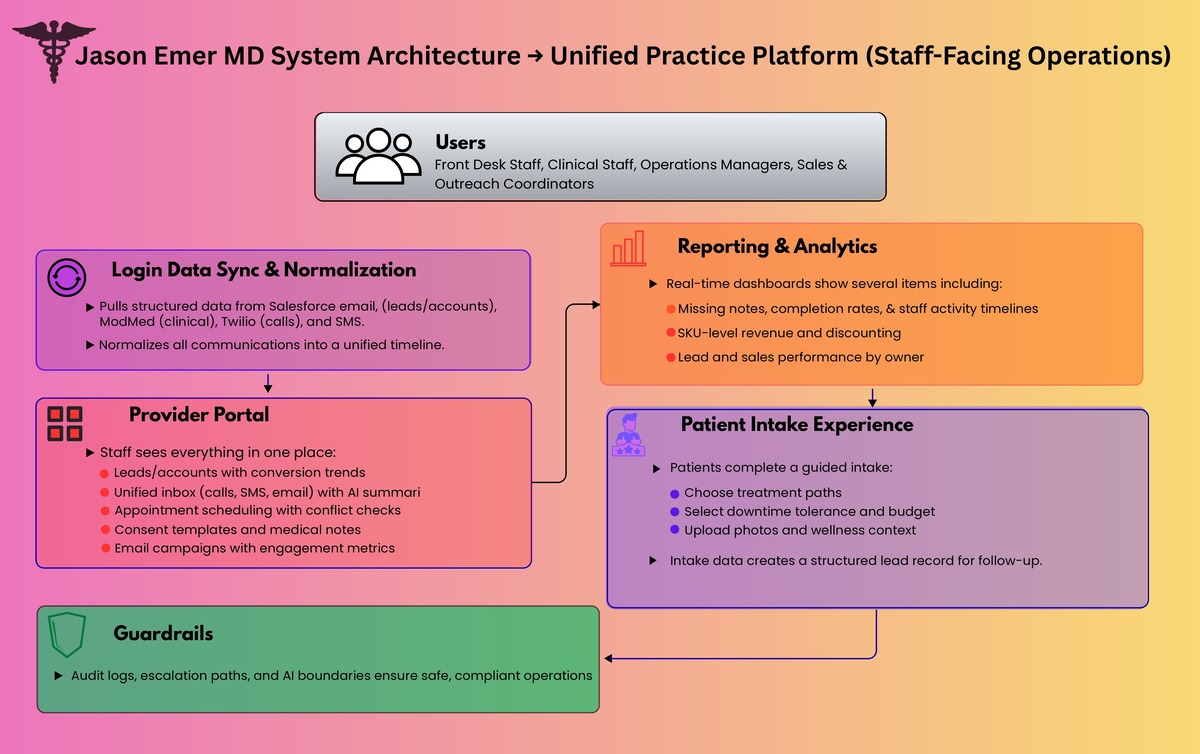
  1. Unified Practice Platform (Provider Portal + Patient Intake Experience)
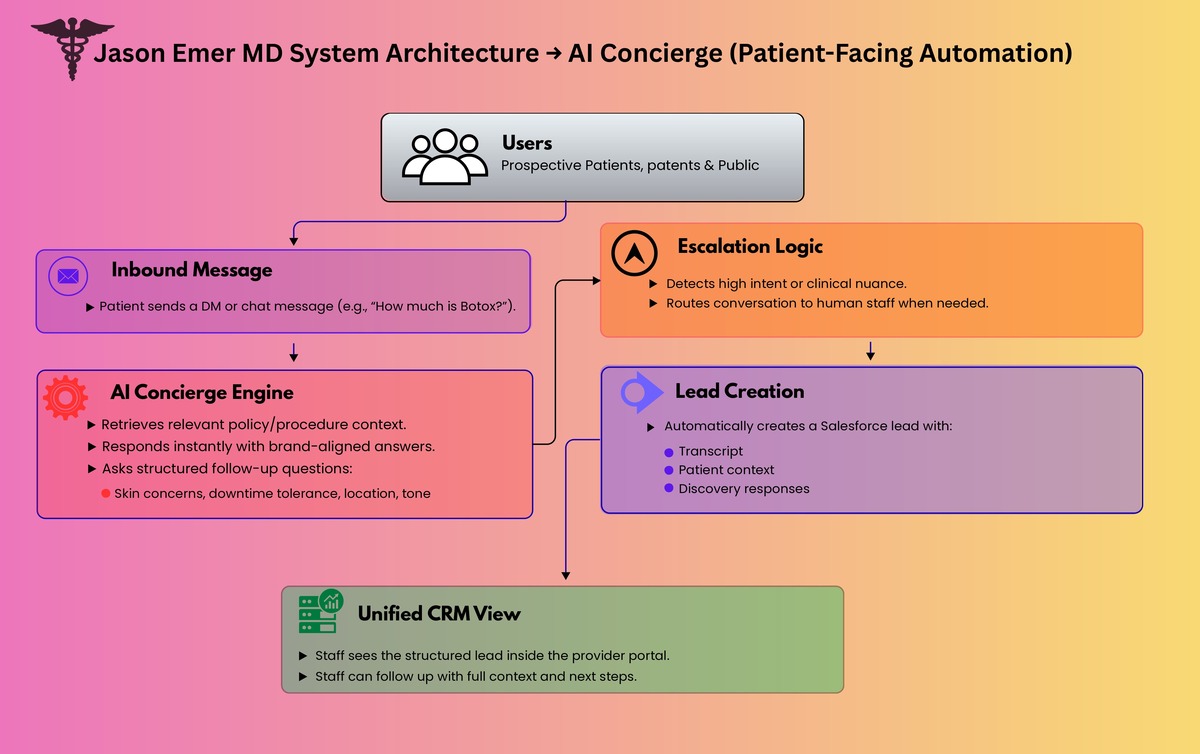
  2. AI Concierge for Instagram and Live Chat

Together, they turn inbound interest into structured intake, routed follow-ups, and measurable operational throughput.

medical CRM automated CRM practice management patient intake lead management clinic software healthcare CRM patient messaging appointment scheduling call transcription

Solution 1: Unified Practice Platform

What staff sees: one place to run the business

Leads + Accounts

  • Leads and converted accounts are pulled from Salesforce on a frequent sync cadence and shown in purpose-built views.
  • Team performance views show leads by owner, conversion rate trends, and top procedures.
  • A “no-cracks” layer highlights uncontacted leads in time windows (example: 3 to 12 hours) so managers can intervene.

Unified Communications Inbox

  • A single communications view aggregates:
    • SMS
    • calls
    • email history
  • Call history includes transcriptions and AI summaries so staff can read what happened instead of hunting through recordings.

Email Campaigns

  • Staff can run outreach directly from the portal with metrics like sends, opens, and replies.

Operations

  • Appointments: schedule and manage appointments with operational constraints (example: avoid same-day cross-city conflicts).
  • Consents: create reusable consent templates, assign them, and track completion.
  • Medical notes: surface patient notes and workflows around completion.
  • Appointment instructions: pre-built instruction templates per appointment type, sent ahead of visits.

Reporting and Risk Controls

  • A reports layer was built to answer urgent operational questions quickly (example: missing notes by time period, completion rates, and breakdowns by status and owner).

Revenue and Performance Analytics

  • A “single pane” analytics dashboard provides:
    • product and SKU-level performance
    • discounting and reason codes
    • activity timelines per staff member
    • lead and sales overviews by owner and time window
  • The point is not generic BI—it is clinic-specific decision surfaces.

What patients see: a guided intake experience

We built a guided, branded intake flow that captures structured data without feeling like a form dump:

  • Choose a “path” (two experiences)
  • Use an interactive body selector to identify focus areas
  • Select intensity and downtime tolerance
  • Provide key parameters (budget range, sensitivity, skin type)
  • Provide optional wellness context (if applicable)
  • Upload photos (front/back) for additional context
  • Submit details and create a lead record for follow-up


call summaries Instagram DMs Instagram automation AI concierge chat automation Salesforce integration ModMed integration Twilio integration unified inbox patient follow up lead tracking

Solution 2: AI Concierge for Instagram and Live Chat

Instagram is a top-of-funnel channel for modern aesthetic practices, but it is operationally brutal at scale. We built an AI concierge that can:

  • answer common questions instantly
  • guide patients through a structured discovery conversation
  • ask the right follow-up questions (skin concerns, downtime tolerance, skin tone, location, etc.)
  • stay aligned to the brand voice (premium, patient-first)
  • escalate to humans when intent is high or clinical nuance is needed
  • create Salesforce leads automatically when the patient asks to be contacted

This turns Instagram from “busy inbox” into a qualified lead pipeline with context.

Architecture Overview

You mentioned you already have an architecture diagram—this is the narrative that should sit next to it.

High-level design

1) Data + systems of record

  • Salesforce as the operational backbone for leads, accounts, quotes, ownership, and activity
  • ModMed (EHR) as the clinical system of record
  • Twilio (or equivalent) for telephony and call recording
  • ManyChat (or equivalent) as the Instagram gateway

2) Unified ingestion and normalization

  • Scheduled sync pulls new Salesforce and operational records into the portal
  • Communications events (calls, SMS, email) are normalized into a consistent timeline model
  • Clinical context is joined where appropriate to give staff a richer patient view

3) AI processing pipelines

  • Call pipeline: recording → transcription → speaker separation → summary → indexed to patient/activity
  • Chat pipeline: message → retrieve policy/procedure context → response generation → safe delivery → logged transcript → optional CRM lead creation

4) Presentation layer

  • Provider portal for operations and analytics
  • Patient intake experience that structures demand before it hits the team

5) Guardrails

  • Audit logs for every interaction
  • Clear boundaries on what the AI can and cannot claim
  • Escalation paths to staff when needed

Results and Impact

  • Minutes, not hours, to understand a call: transcriptions and summaries make phone conversations instantly actionable.
  • Sub-minute responses on high-volume social channels, converting attention into structured patient journeys instead of stalled DMs.
  • Reduced lead leakage via “uncontacted lead” rules and manager visibility by owner/team.
  • Operational clarity: appointments, consents, notes, instructions, and reporting centralized in one system.
  • Better decision-making: revenue, SKU performance, discounting, staff activity, and lead/sales trends visible in one place.

Why It Worked

This wasn’t “AI bolted onto a CRM.” It was an operating system approach:

  • unify the clinic’s reality (calls, texts, email, IG, scheduling, notes)
  • turn unstructured conversations into structured next actions
  • keep Salesforce/ModMed as systems of record while making them actually usable day-to-day
  • build automation where it removes toil, not where it introduces risk

Krazimo helped Dr. Jason Emer’s practice scale patient engagement without sacrificing the premium experience. By combining a unified operations platform with an AI concierge that can handle high-volume inbound demand, the practice gets faster response times, cleaner follow-ups, and clearer operational control—without ripping out existing systems.


Let the Phones Run Themselves!

Impact

  • Fully automated the “basic questions” layer across industries, so routine calls no longer require staff time.
  • Human involvement dropped as low as 2-3% for businesses with simple, repeatable workflows such as restaurants.
  • Consistently faster responses and fewer missed calls, because the agent can answer immediately, every time, including after hours.

The problem

Most businesses still run on phones. Reservations, order status, lead intake, scheduling, and support all come through voice. But traditional phone automation is either rigid (IVR trees) or fragile (scripts that break the moment a customer says something unexpected). Modern voice AI is powerful, but adoption fails for three predictable reasons:

  1. Businesses do not just need a voice. They need actions: bookings, lookups, updates, routing, and follow ups.
  2. Telephony is a real stack: phone numbers, routing, call logging, and reliability are non negotiable.
  3. Every business has slightly different workflows, so generic agents collapse in the details.

Our Solution

The key idea

Voice AI becomes valuable only when it is deployed as a workflow engine, not a talking demo. Blink Concierge was built to make voice agents act like trained staff members by combining:

  • Telephony native infrastructure
  • A workflow and tool calling layer
  • A model agnostic voice layer
  • White glove deployment for real integrations and edge cases

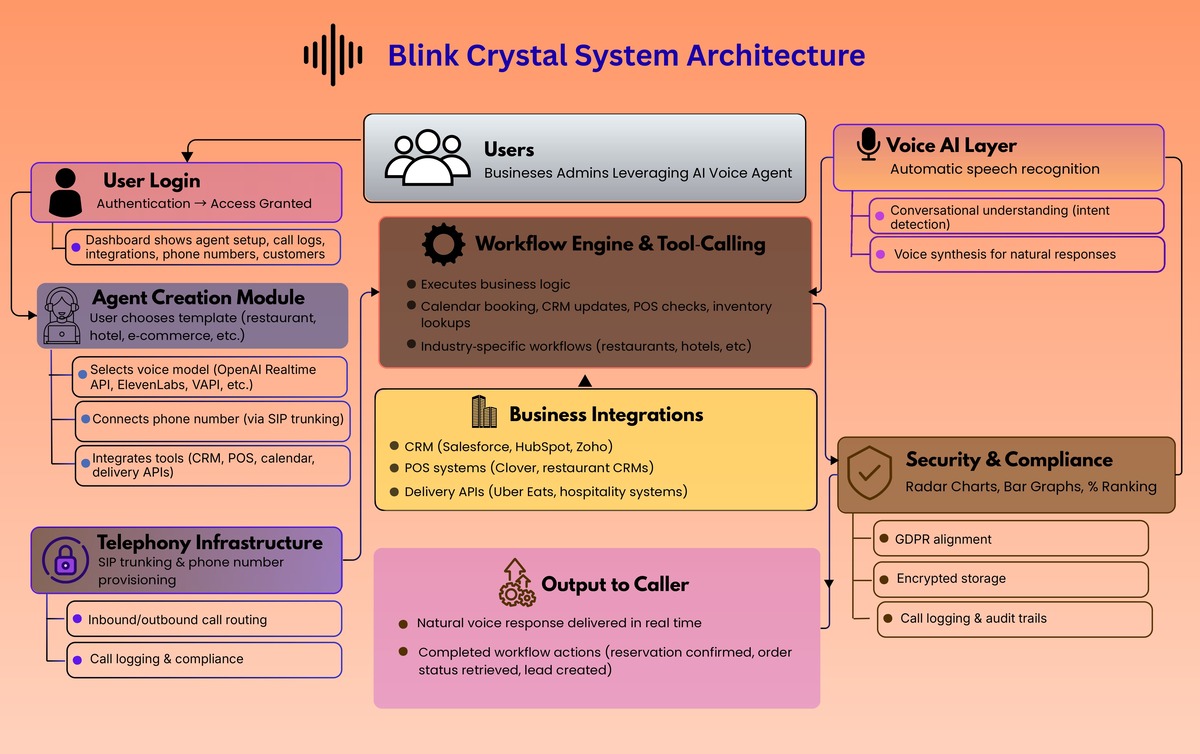
Blink Concierge is a platform to create and deploy AI voice agents that can be assigned to real phone numbers, handle inbound calls, and execute business workflows. Under the hood, the platform includes an operator console (BlinkCrystal) that supports:

What We Built

  • Contact management and call initiation
  • Agent creation and configuration (prompt plus first message as the core primitive)
  • Phone number provisioning and assignment of an agent to a number
  • Call history with transcript, summary, and recording

Final Review page 0003

Architecture overview

The system breaks into four layers that work together.

1) Telephony layer

This is the foundation. The platform provisions phone numbers, routes inbound calls to the right agent, and captures call artifacts (recordings, transcripts, summaries). This is what turns “AI voice” into an actual business phone system.

2) Agent layer

Agents are defined as configurable entities with:

  • A system prompt that encodes role, policy, and workflow behavior
  • A first message that sets tone and call opening behavior

This makes it fast to create agents for specific jobs such as reservation handling, order handling, lead intake, and support triage.

3) Workflow and tool calling layer

This is the differentiator. The agent is not only conversational. It can trigger actions such as:

  • Creating reservations or appointments
  • Updating CRM records
  • Looking up order status
  • Routing or escalating calls
  • Capturing structured intake data for follow up

This layer is also where industry specificity lives. Restaurants, hotels, funeral homes, real estate, and e commerce all share the same primitives, but differ in workflows, integrations, and escalation rules.

4) Model agnostic voice layer

The platform is designed to support multiple voice providers, so clients can choose based on realism, latency, cost, or vendor preference, without rewriting workflow logic. The agent logic stays stable while models evolve.

How it works end to end

Flow A: Create and deploy an agent

  1. Create an agent (prompt plus first message)
  2. Assign it to a phone number
  3. Turn on routing so inbound callers reach the agent instantly
  4. Review call history artifacts to iterate quickly

Flow B: Run calls as workflows

  1. Caller states intent in natural language
  2. Agent identifies the workflow path
  3. Agent executes tool calls (book, look up, create, update)
  4. Agent confirms outcomes and closes the loop
  5. Platform stores transcript, summary, and recording for QA and training

Flow C: Human in the loop only when needed

Blink Concierge is designed to automate routine questions completely, then escalate only when:

  • A workflow falls outside the configured policy
  • The caller request is ambiguous or sensitive
  • A tool call fails or requires human judgment

That is how human involvement can drop to 2 to 3 percent for simple businesses like restaurants, while remaining higher for industries with complex or high risk edge cases.

Where it shines

  • Restaurants: reservations, pickup and delivery status, menu questions, hours, basic routing
  • Hospitality: after hours requests, basic service routing, simple bookings
  • E commerce: order lookup, shipping status, returns initiation, ticket creation
  • Real estate: lead qualification, scheduling, routing to agents
  • Sensitive industries: structured intake plus careful escalation policies

What makes it different

Most voice products stop at “make the model talk.” Blink Concierge treats voice as the top layer of an automation stack: telephony reliability, workflow execution, integrations, and deployment support. That is why it can fully automate handling user requirements in production, not just in a demo.


Gamifying Sales Training

Impact

  • Faster ramp for new reps by letting them simulate dozens of realistic calls before they speak to a real customer.
  • Higher win rates driven by stronger discovery and objection handling, reinforced through repeatable practice and feedback loops.
  • Scalable coaching without manager burnout, because the platform automates analysis and surfaces gaps instead of relying on manual review.

Client overview

PitchMee is an AI driven sales training and performance platform built for high velocity teams, combining simulation, peer roleplay, and real meeting analysis into one system. 

The problem

Sales teams have a training problem that most tools never solve:

  • Practice is inconsistent, hard to schedule, and rarely feels like real buyer pressure.
  • Feedback is often subjective, delayed, or based on too small a sample of calls.
  • Managers cannot realistically coach every rep while also running the sales pipeline.
  • Real sales calls are where deals are won or lost, but they often go unreviewed at scale.

Goals

  • Create a training loop that is interactive, not slide based.
  • Make coaching measurable, not vibes based.
  • Give managers team wide visibility without needing to listen to everything.
  • Let teams practice in multiple modes: AI simulations, peer roleplays, and real meeting intelligence.

The solution

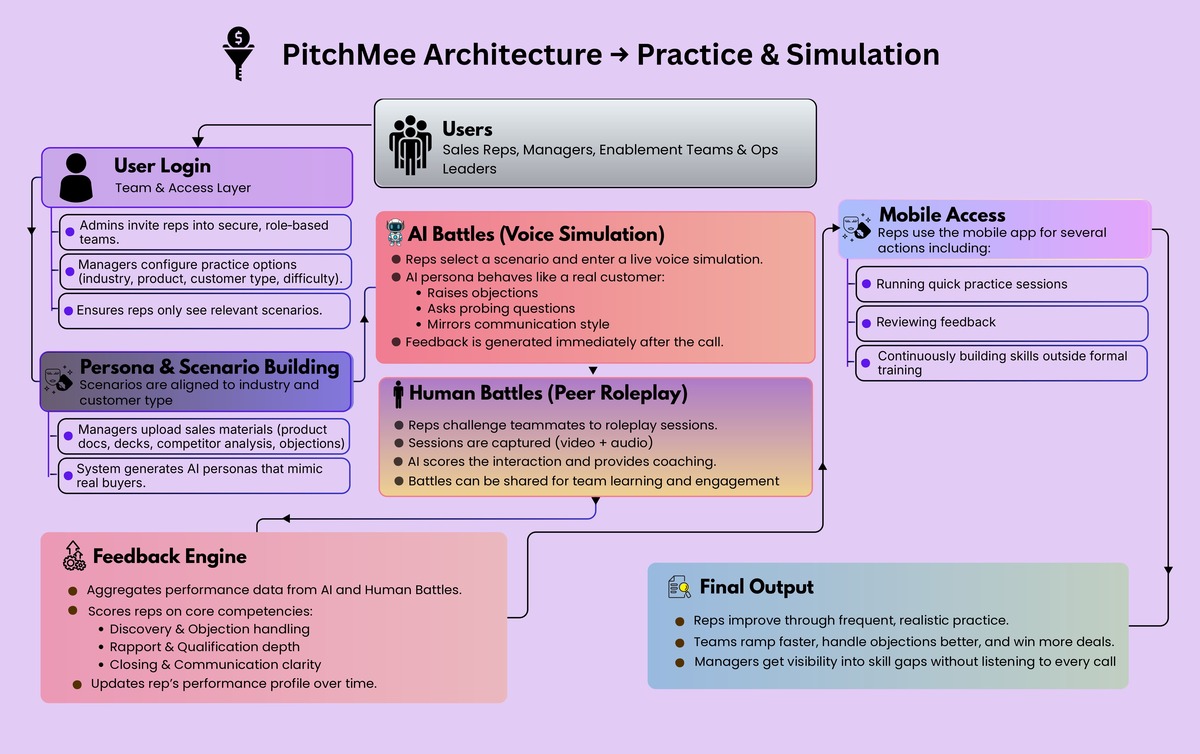
PitchMee is built around three reinforcing systems:

  1. AI Battles: simulated voice calls where reps pitch to an AI persona acting as a real customer, including objections and industry specific behavior.
  2. Human Battles: peer to peer roleplay captured as video and audio, then scored with AI generated coaching.
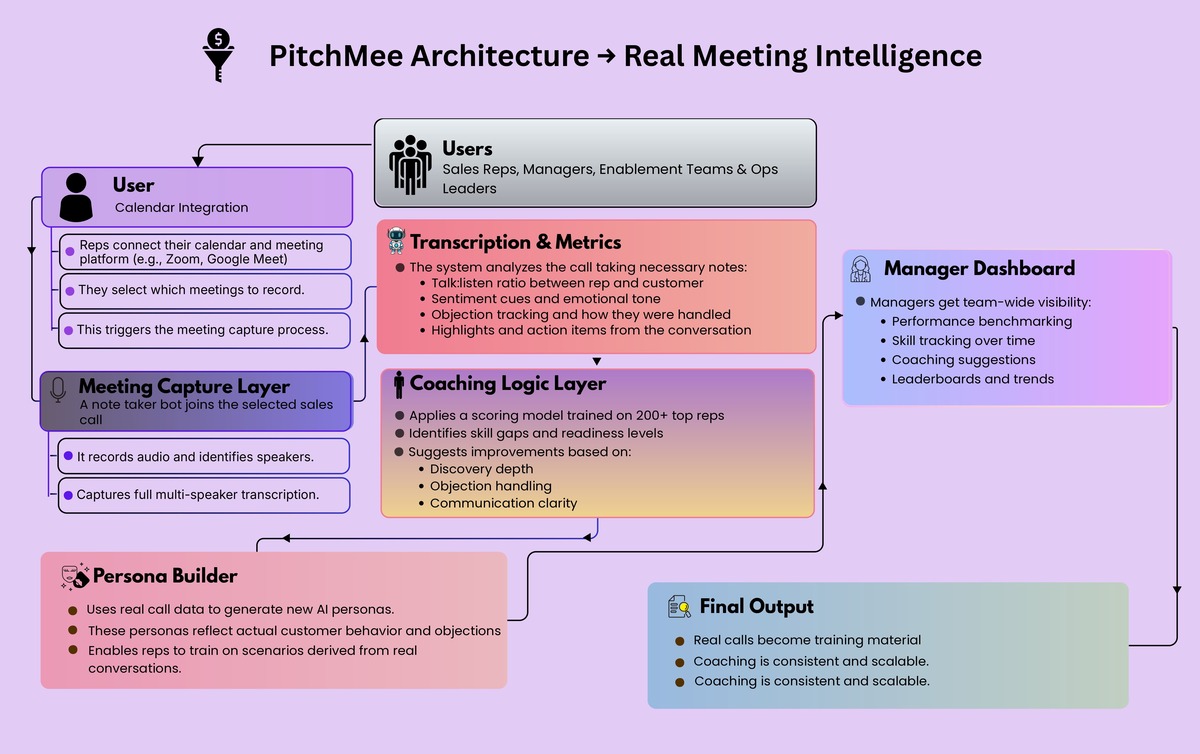
  3. Meeting Analysis: a note taker joins real sales calls, records them, and produces transcripts, scores on talk:listen ratio, highlights, sentiment cues, and objection tracking.

Together, this turns sales training into something reps actually use to learn and get better, and something managers can track.

How it works end to end

Flow A: AI Battles

  1. Rep selects a scenario configuration (industry aligned presets, customer type, difficulty).
  2. Rep enters a live voice simulation with an AI buyer persona.
  3. After the call, PitchMee generates feedback and updates the rep’s performance profile over time.

Flow B: Human Battles

  1. A rep challenges a teammate to a roleplay based on a chosen configuration.
  2. The battle is captured (video and audio), then scored and reviewed with AI generated coaching.
  3. Battles can be shared within the team for lightweight engagement and learning culture.sales training AI sales coaching sales roleplay sales call coaching sales enablement sales coaching software call recording analytics conversation intelligence objection handling training sales onboarding

Flow C: Real meeting analysis

  1. User connects calendar and meeting system, and selects meetings to record.
  2. Note taker joins and records the call.
  3. PitchMee produces transcript, metrics, highlights, sentiment cues, and objection handling guidance.
  4. Managers can use real calls to generate new training personas, turning actual field conversations into repeatable practice.sales training AI sales coaching sales roleplay sales call coaching sales enablement sales coaching software call recording analytics conversation intelligence objection handling training sales onboarding

Architecture overview

PitchMee is best understood as five layers:

1) Team and access layer

  • Invite only teams, with role based access (admins can see both manager and user experiences; members focus on practice).
  • Team level configuration that controls what practice options are available (industry, product categories, customer types, difficulty presets).

2) Real time voice simulation layer

AI Battles are voice first (not chat). Under the hood, PitchMee uses the OpenAI Realtime API so the AI can behave like a buyer in a live conversation: asking probing questions, challenging assumptions, raising objections, and mirroring communication styles. 

3) Persona and scenario building layer

Managers can build custom AI personas for their teams by uploading materials like product docs, sales decks, competitor analysis, and objection lists. The system then constructs a persona that understands the product, mimics the buyer, and adapts based on rep responses. 

4) Meeting capture and analysis layer

For real calls, PitchMee inserts a note taker into sales meetings and generates:

  • multi speaker transcription
  • rep vs customer talk time separation
  • talk to listen ratio scoring
  • highlights and action items
  • sentiment and tonal cues
  • objection tracking and suggested improvements

This is strengthened by coaching logic informed by a partner organization with 200 plus top performing reps, embedded into the coaching engine. 

5) Feedback, dashboards, and mobility

  • A feedback engine that scores core competencies such as discovery, objection handling, rapport, qualification depth, closing, and communication clarity, with results aggregated over time.
  • A manager dashboard that consolidates battles, meetings, benchmarking, skill scoring, trend analysis, leaderboards, and coaching suggestions.
  • A mobile app so reps can run quick practice sessions, review feedback, and build skill continuously, not quarterly.

Results

In early deployments, PitchMee has delivered:

  • Faster onboarding and ramp for new reps.
  • Higher win rates driven by improved discovery and objection handling.
  • Consistent coaching at scale with reduced manager load.
  • More confident teams and healthier learning culture through frequent practice and peer competition.

Lessons learned

  • Voice based simulations create more realistic pressure and better learning than text prompts alone.
  • Coaching must be structured and data driven to scale beyond a single great manager.
  • Short, frequent practice changes behavior faster than occasional training workshops.

Conclusion

PitchMee brings AI simulation, peer roleplay, and real meeting intelligence into one training loop that is measurable, repeatable, and manager friendly. Reps get a realistic place to practice and improve. Managers get high fidelity visibility into skill gaps and readiness. And sales orgs finally get a scalable way to raise performance without burning coaching bandwidth. 


A Research Assistant That Actually Runs The Work

Client overview

Chip Inc is building an AI powered research assistant for academics. The goal is simple to state and hard to ship: help researchers move faster by automating the tedious parts of research while still supporting serious computation and reproducible workflows.

The problem

Academic research has a hidden tax that steals time from actual thinking.

  • Manual data work eats hours: gathering sources, cleaning data, extracting tables, rewriting code, rerunning experiments.
  • Computation is fragmented: researchers bounce between Python, MATLAB, symbolic tools, notebooks, and web tools, often with painful setup and dependency issues.
  • Tools lack project memory: most assistants answer a question, then forget the project context and assumptions that make research coherent.
  • Safety and control matter: autonomous actions such as credentials, external tools, and code execution need guardrails, not blind automation.

Goals

  • Build an AI research bot tailored for academic workflows, not generic chat.
  • Enable real execution, including advanced interpreters and symbolic math tooling.
  • Support end to end research pipelines: retrieval, computation, drafting, and iteration.
  • Keep the system modular so new tools and workflows can be added without rewriting the core.

The solution

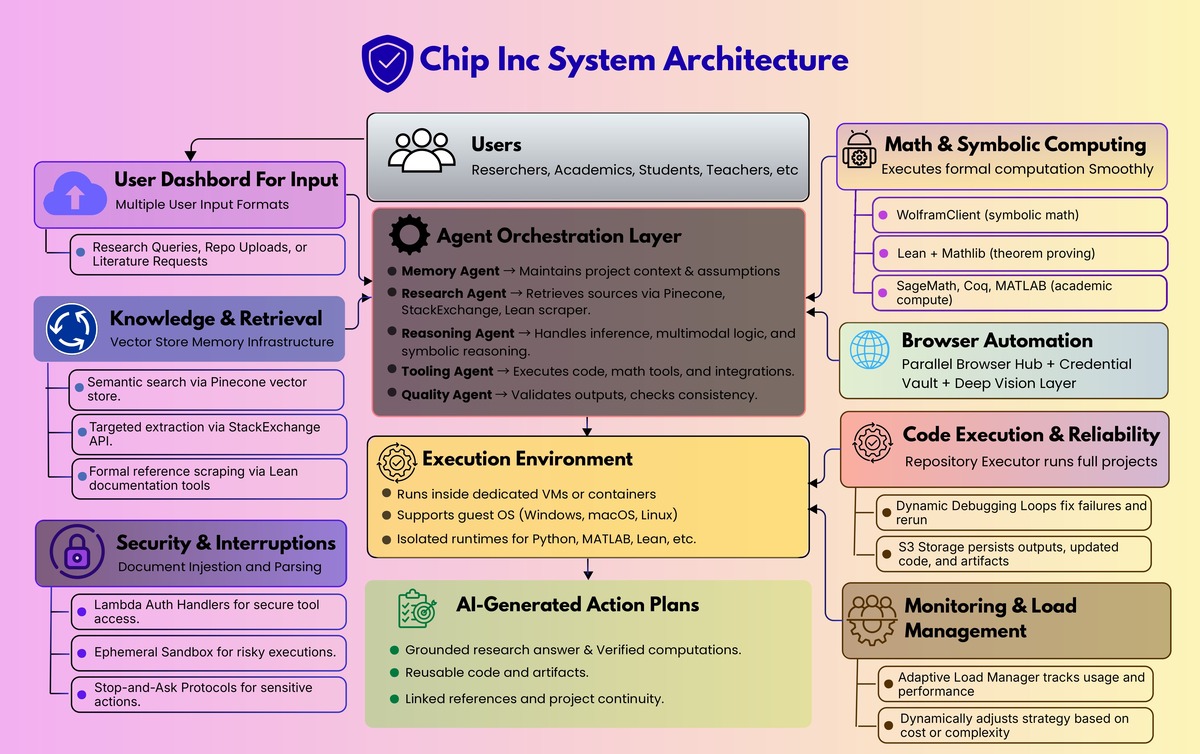
Krazimo partnered with Chip Inc to build a modular “research executor” that combines:

  • A conversational interface for research queries and planning
  • A multi agent orchestration layer for retrieval, memory, reasoning, and verification
  • A controlled execution environment for running code, math tools, and workflows
  • A browser automation subsystem for parallel research and action steps
  • A security and interruption framework so autonomy remains user controlled

In other words, it is not a chatbot. It is a research assistant that can retrieve, run, verify, and iterate.

AI research assistant agentic AI research automation AI workflow automation AI code execution browser automation AI AI with memory AI tool calling symbolic math AI theorem proving AI

Architecture overview

1) Core agent orchestration

At the center is an orchestrator that plans work, delegates to specialists, and compiles the final output:

  • Orchestrator Agent: coordinates the plan and compiles the final answer
  • Research Agent: retrieval and knowledge gathering
  • Memory Agent: project context, assumptions, continuity
  • Reasoning Agent: advanced inference plus multimodal reasoning
  • Quality Agent: testing, verification, consistency checks
  • Tooling Agent: tool execution and integrations

This separation is what lets the system stay robust as capabilities expand. Each agent has a clear job, and the orchestrator keeps the overall task coherent.

2) Knowledge and retrieval that supports real research

The research assistant needs to cite and ground itself.

  • Pinecone vector store for semantic retrieval
  • StackExchange API for targeted technical knowledge extraction
  • Lean documentation scraper for pulling authoritative references when formal reasoning gets specific

The goal is to reduce time lost to searching and keep responses anchored in retrievable sources.

3) Math and symbolic computing as first class tools

A core requirement for academic users is being able to execute formal and mathematical work.

  • WolframClient for symbolic computation
  • Lean plus Mathlib for theorem proving and formal verification
  • SageMath, Coq, and MATLAB support for broader academic compute needs

This turns the assistant into a computational partner rather than only a writing helper.

4) Virtualization and execution environments

To run real workloads safely and repeatably, the system executes inside controlled environments:

  • Dedicated VM or container per workspace
  • Runs a guest OS (Windows, macOS, Linux) when needed
  • Executes language runtimes and dependencies inside that environment

This supports messy real world repos and research tooling without forcing users to configure everything locally.

5) Browser automation for research plus action

Research often requires interacting with portals and UIs that are not API friendly.

  • A Parallel Browser Hub for multi tab execution
  • A Credential Vault for secure login flows
  • A Deep Vision Layer to support spatial UI interaction when DOM automation is insufficient

6) Code execution and CI style reliability

For repo level work, the system includes:

  • Repository Executor to run projects, not just read them
  • Dynamic Debugging and Self Correction loops when execution fails
  • S3 storage to persist outputs, updated repos, and artifacts

7) Monitoring, state estimation, and load management

Autonomous systems need resource awareness.

  • Usage and performance metrics feed an Adaptive Load Manager
  • The system can change strategies when cost or complexity spikes instead of blindly continuing

8) Security and interruptions

Autonomy without controls is a liability. The platform includes:

  • Lambda Auth Handlers for secure integration access
  • An Ephemeral Sandbox for risky execution contexts
  • A broader stop and ask approach for sensitive actions such as credentials, authentication, and protected resources

How it works in practice

Flow A: Research, compute, write

  1. The user asks a research question or defines a goal.
  2. The orchestrator decomposes the work across retrieval, compute, and drafting.
  3. The Research Agent gathers sources and references.
  4. The system executes math or code as needed (Wolfram, MATLAB, Lean, Python).
  5. The Quality Agent validates outputs and flags inconsistencies.
  6. The assistant returns a grounded answer plus reusable artifacts.

Flow B: Run the repo, fix the failures

  1. The user provides a repository or project goal.
  2. The system sets up runtimes and dependencies in the dedicated environment.
  3. It executes the project.
  4. If it fails, it debugs, edits, and reruns until stable.
  5. Outputs and updated code are stored for handoff and iteration.

Flow C: Parallel browsing for literature and evidence

  1. The user requests multi source research.
  2. Parallel browser agents collect information simultaneously.
  3. Credentialed steps are gated and handled via the vault and auth handlers.
  4. Retrieved evidence is summarized and linked back into the project context.

Implementation snapshot

  • Modular backend designed to support new tools and interpreters without destabilizing the core.
  • Secure artifact storage through S3.
  • First functional prototype delivered in roughly 4 months, followed by iterative expansion.

Expected impact

Chip Inc’s aim is to reduce time spent on repetitive research tasks and lower the barrier to advanced computation for academics, especially for users who do not want to become infrastructure engineers just to run serious workflows.

The bigger shift is qualitative: research time moves from setup and busywork to analysis and insight.

This project shows what it takes to make AI genuinely useful for complex knowledge work. The value is not a larger model. It is the engineering around the model: orchestration, execution, verification, retrieval, and safety controls.


Automating CBSE Exam Grading with AI

Impact

  • 60 percent reduction in grading time, giving teachers more time to teach and mentor.
  • More consistent evaluation across students and graders, improving fairness and transparency.
  • Actionable feedback for students, showing where marks were lost and how to improve.

Client overview

Arivihan is an edtech company focused on improving education outcomes in India. They set out to modernize how CBSE board exam style answers and mock tests are evaluated by automating subjective grading and feedback.

The problem

CBSE style grading is high effort and hard to scale:

  • Subjective answers take time to evaluate, especially at school scale.
  • Inconsistency is common, with different evaluators awarding different marks for similar answers.
  • Growing test volume makes manual grading a bottleneck for schools and coaching programs.

Arivihan needed a system that could grade consistently against a marking scheme, at scale, while still giving useful feedback.

Goals

  • Build an AI powered grader for CBSE board exams and mock tests.
  • Ensure grading is consistent and fair, aligned to a predefined marking scheme.
  • Generate detailed, student-friendly feedback that explains deductions and improvement steps.
  • Integrate cleanly into Arivihan’s existing platform via APIs.

The solution

Krazimo built a scalable AI grading system that takes in the question, expected answer structure, and marking scheme, then evaluates student responses to produce both marks and feedback.

Key components:

  • Marking scheme based grading: Evaluates subjective answers against defined criteria, not vague similarity.
  • Deduction explanations: Highlights where marks were lost and why.
  • Personalized improvement guidance: Actionable suggestions aligned to the rubric.
  • Reporting: Detailed student and teacher reports to track performance and identify common misconceptions.
  • Integration APIs: Designed for drop-in use inside Arivihan’s edtech workflows.

CBSE answer checking , CBSE paper checking , subjective answer checking , AI exam grading , automatic grading , online answer evaluation , rubric based grading , student feedback, teacher grading tool CBSE marking scheme

Architecture overview

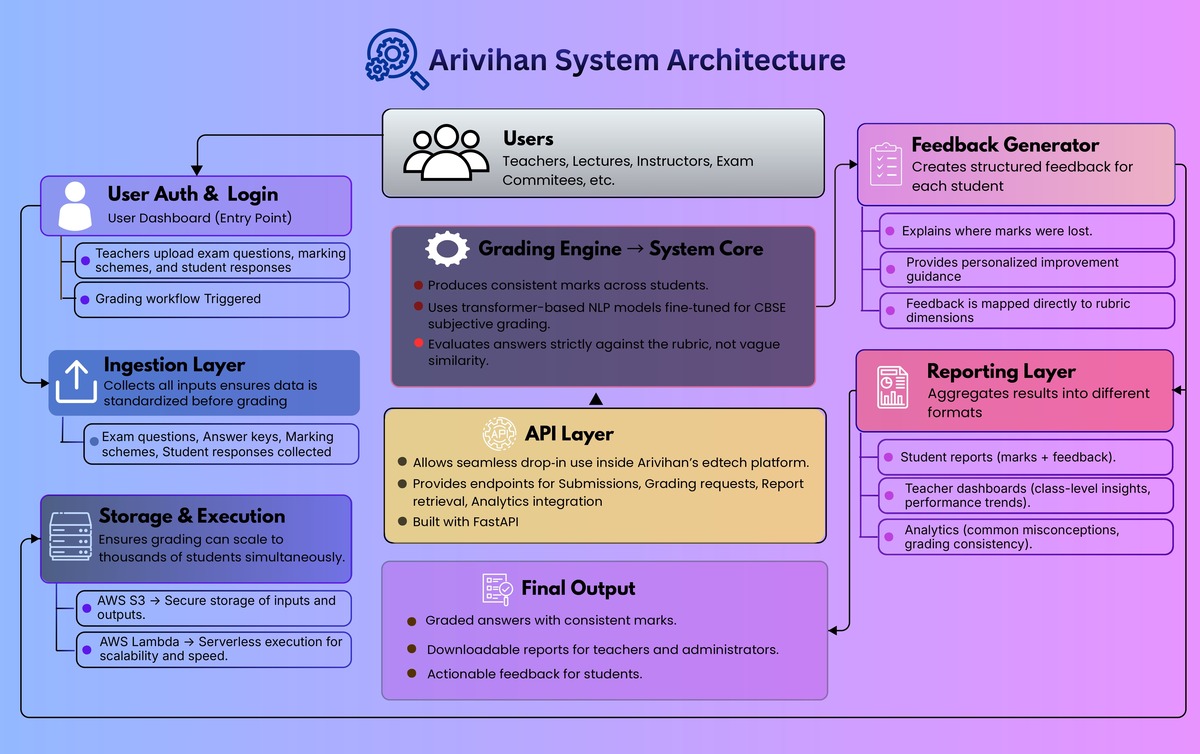
  • Ingestion layer: Accepts questions, answer keys, marking schemes, and student responses.
  • Grading engine: Applies transformer-based NLP models fine-tuned for subjective grading, guided by the rubric and expected points.
  • Feedback generator: Produces structured feedback mapped to rubric dimensions (what was missing, what was incorrect, what to do next).
  • Reporting layer: Aggregates results for student reports, teacher dashboards, and class-level insights.
  • API layer: FastAPI endpoints for submission, grading, report retrieval, and analytics.
  • Storage and execution: AWS S3 for secure storage of inputs and outputs; AWS Lambda for scalable, serverless execution.

Implementation snapshot

  • Backend: Python with FastAPI
  • Execution: AWS Lambda
  • Storage: AWS S3
  • Modeling approach: Transformer-based NLP models fine-tuned for CBSE-style subjective grading
  • Delivery timeline: 4 months

Outcome

The AI grader significantly improved Arivihan’s evaluation workflow:

  • Grading time dropped by about 60 percent.
  • Evaluation became more consistent across students and test cycles.
  • Students received clearer, more actionable feedback to improve future answers.

This project shows how AI can modernize education workflows when it is tied to a clear rubric and designed for scale. For Arivihan, the result was faster grading, fairer evaluation, and better feedback—without increasing teacher workload.


Paid Faster, Paid More – Revolutionizing Restoration

Impact

  • Faster cycle time: Response time to insurer and TPA requests dropped from multiple days to a few hours, including verification.
  • Higher returns: ~6 percent improvement in settlements through more consistent, persistent, standards backed defenses.
  • Less manual work: About 45 hours saved per week for one restoration company.
  • Net value: About 800k in projected annual impact, combining settlement lift plus hours saved.
  • Big market leverage: This pattern scales across 3,000+ restoration companies in the US.

The problem

Restoration is backwards compared to most industries. The work starts immediately (flood, fire, mold), and only after the job is complete does the justification and invoicing battle begin. In practice, carriers and TPAs operate in a “delay, deny, defend” posture that forces restoration teams to prove every decision after the fact. 

That proof burden is not simple paperwork. It requires technical precision across standards (IICRC S500, S520, plus state variations), job evidence (photos, moisture logs), and fast, consistent responses. 

The core idea

Automation is only valuable here if it is credible. JSTFYD is built on one central insight: AI can accelerate and improve claim justification only when it is grounded in standards, job level evidence, and historical claim data, with outputs that remain reviewable and auditable. 

What we built

JSTFYD combines three capabilities into one claims platform: standards grounded claim communication, claims aware project management, and estimate comparison plus validation tools. 

In the product demo, these show up as dedicated modules (JSTFYD Studio, Compare Estimate, Projects, Inbox), built to match how restoration teams actually work day to day.

water damage claims insurance dispute claim denial claim appeal TPA claims insurance TPA restoration billing catastrophe claims invoice dispute claim justification IICRC S500

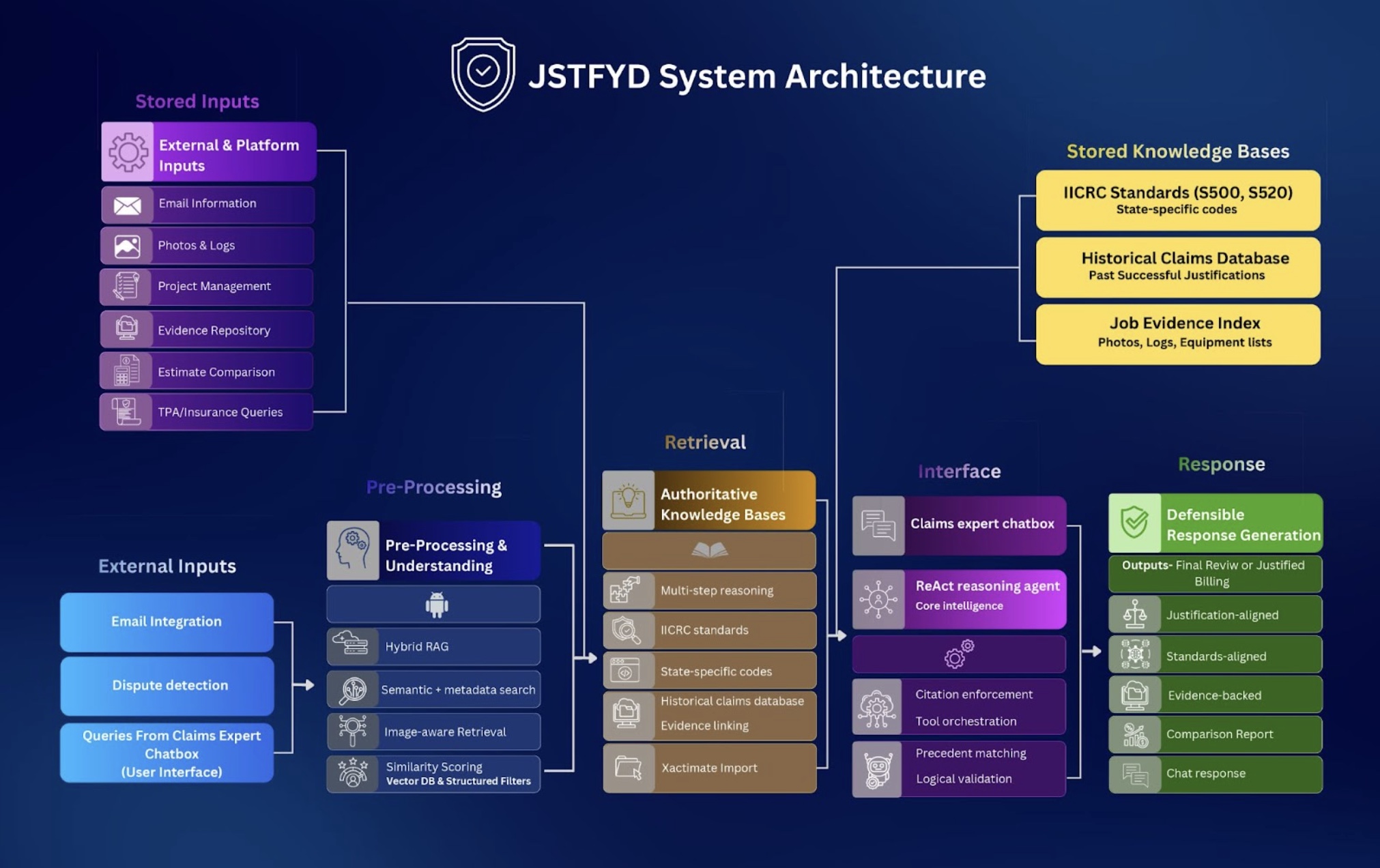
At a high level, the system is designed so every generated defense can be traced back to the right source material. Four architecture decisions matter most:

1) Hybrid retrieval that is meaning aware and citation accurate

Instead of relying on embeddings alone, JSTFYD uses hybrid retrieval that combines semantic similarity with structured metadata such as standard name, section and page number, document type, and categorized summaries of uploaded items. 

This is what keeps citations precise when the dispute hinges on exact standard language.

2) Image aware evidence retrieval

Every uploaded photo is converted into a short description, vectorized, and stored with metadata so it can be retrieved as evidence during a dispute. 

The document’s example is explicit: if an insurer challenges equipment placement, the system can retrieve the relevant room photo and use it directly in the response. 

3) A ReAct style agent for multi step claim reasoning

A single agent orchestrates tool calls across standard lookup, image retrieval, evidence compilation, response drafting, and email formatting, which is important when one dispute touches multiple standards and multiple pieces of job evidence. 

4) Citation enforced replies, plus precedent

Every justification email cites the relevant IICRC or state standard, references uploaded evidence, and links comparable past claims. 

JSTFYD also indexes past restoration jobs and retrieves precedents when insurers challenge similar usage again, strengthening consistency over time. 

How the workflow runs in practice

Workflow A: Set up a job once, then reuse the evidence forever

JSTFYD structures each job as a project, where teams upload invoices, photos, moisture logs, technician notes, equipment lists, and any supporting evidence. 

In the demo, the project flow operationalizes this with a guided intake that asks for required documentation like moisture logs and an Xactimate estimate, with optional photo logs and additional documents.

Workflow B: Dispute email in, defensible draft out

JSTFYD integrates with existing email workflows so teams do not have to change how they communicate. When a dispute email arrives, the platform triggers the justification engine. 

In the demo, this appears in the Inbox as claim threads tied to projects, with one click email draft generation. The goal is simple: a faster turnaround, with a response that is grounded in standards and supported by job evidence.

Workflow C: Estimate reductions, compared and rebutted line by line

Insurers often send reduced estimates, sometimes dramatically lower, hoping the restoration company accepts them. 

JSTFYD’s comparison engine takes the original Xactimate estimate and the insurer’s revised version, highlights removed or reduced line items, explains why they matter, references standards to defend them, and compiles everything into a ready to send email. 

In the demo, this is exposed as a Compare Estimate view that shows line items side by side, flags detected changes, and generates a written justification per item.

Workflow D: Validation before sending

Before any invoice or justification email is sent, the system checks that required evidence is present, verifies alignment with standards, confirms documentation completeness, and flags missing photos or logs. 

This prevents weak packets from going out and reduces rework, especially for newer staff.

An expert in your pocket for the whole team

Not everyone at a restoration company is fluent in standards or dispute strategy. JSTFYD includes an AI powered claims expert chat that understands IICRC standards, state specific regulations, the full project data, the invoice and evidence, dispute history, and past claim precedents. 

This reduces dependence on scarce internal specialists and helps teams get better at documentation and rebuttals over time.

Why the outcomes moved

The doc summarizes the operational drivers clearly: faster responses, fewer communication delays, reduced manual email workload, and fewer disputes because well supported justifications close arguments faster. 

That is the mechanism behind the business outcomes you care about: speed, higher settlement consistency, and large weekly labor savings that compound at scale.

JSTFYD turns a chaotic, adversarial workflow into a structured, defensible, and scalable process by grounding AI in IICRC standards, structured evidence, hybrid retrieval, and precedent. 

The result is not “AI that writes emails.” It is a claims system that helps restoration companies secure what they rightfully earned.  


A Clear Benchmark for Financial Advisors

Key takeaways (impact)

  • Objective benchmarking for advisors: Advisors get clear percentile based positioning, module scores, and strength and weakness profiles, without subjective interviews.
  • Compliance safe by design: Scoring is fully deterministic, and generative AI is not used in the scoring algorithm, which preserves transparency and regulatory credibility.
  • Faster iteration on assessment quality: AI is used upstream to help experts generate and refresh questions, modules, weights, insights, and report templates as markets evolve.
  • Actionable next steps, not just a score: After deterministic scoring, the platform generates context driven action plans grounded in an expert knowledge base.

The problem

Choosing a financial advisor is harder than it should be. Regulations limit what advisors can advertise, the industry lacks standardized evaluation frameworks, and high net worth families often default to trust, referrals, or superficial signals. 

That opacity creates four gaps: clients cannot reliably compare advisors, advisors cannot benchmark against peers, firms lack a consistent improvement framework, and matching families to advisors becomes guesswork. 

The key idea

Point93 is built on a simple principle: the evaluation must be deterministic and benchmark aligned, and AI should help design the assessment, not evaluate the people taking it. 

Our solution

Point93 is a structured, multi module self assessment that measures an advisor across capabilities, philosophy, operations, and stewardship, then compares results against peers and expert derived best practices. 

The system sits on four pillars: expert knowledge ingestion, AI assisted questionnaire creation, deterministic scoring, and a comprehensive reporting engine. 

choose a financial advisor, find a financial advisor, best financial advisor, financial advisor near me, fiduciary financial advisor, fee only financial advisor, financial advisor fees, questions to ask a financial advisor, how to pick a financial advisor, financial advisor

Architecture overview

1) Expert knowledge as the foundation

Point93 starts with practitioner expertise. An experienced advisor provided frameworks, evaluative guidelines, scoring philosophies, operational best practices, risk and compliance considerations, and service quality indicators that form the backbone of the assessment model. 

This corpus is processed into a semantic RAG pipeline using vectorization and dot product retrieval, optimized for high precision recall of expert principles when questions and modules are created or refined. 

2) AI assisted assessment creation (upstream, expert controlled)

The questionnaire spans 17 modules, each with 30 to 40 questions, using multiple formats, including multiple choice, rating scales, free form responses, Likert style questions, and scenario based selections. 

AI is used heavily in creation to generate initial and replacement questions, update modules, propose scoring weights and point allocation, and produce insight areas, report structures, and feedback templates. 

Crucially, this is expert supervised, and knowledge is sourced from the partner advisor, not the public internet. 

3) Deterministic scoring and benchmarking (no generative AI in scoring)

Once an advisor completes the assessment, Point93 applies a fully deterministic scoring engine with defined weights, validated scoring logic, proficiency thresholds, benchmarks from expert knowledge, and comparative markers from peer data. 

Outputs include percentile rankings, module level scores, benchmark comparisons, peer charts, weighted aggregate scores, and strength and weakness profiles. 

No part of the scoring algorithm involves generative AI, which is a deliberate credibility and regulatory safety decision. 

4) Reporting that is usable, not just “data”

After scoring, advisors receive a detailed report delivered digitally and via email, with radar charts, bar graphs, percentiles, peer overlays, benchmark maps, narrative insights, action items, and strength and risk zones. 

5) AI generated action plans (the only end user facing AI)

After deterministic scoring is complete, AI uses the advisor’s results plus peer averages and benchmarks to propose concrete improvements across operations, strategy, communication, portfolio management, and practice management, grounded in the expert knowledge base. 

How it works, end to end

  1. Experts shape the evaluation foundation: Partner advisor knowledge is ingested into the RAG knowledge base.
  2. Admins iterate the assessment quickly: When creating or refining modules, RAG retrieves the most relevant expert principles, then AI helps draft questions, weights, and templates.
  3. Advisors complete the assessment: 17 modules, 30 to 40 questions each, mixed formats for higher fidelity.
  4. Deterministic scoring runs: Transparent, repeatable scoring and benchmarking, producing percentiles and comparisons.
  5. Report plus action plan is delivered: Visuals, narrative insights, and AI generated improvement plans.

Results and early value

In early usage, the platform delivered clear benchmarking, visibility into operational blind spots, a structured improvement path, and professional grade reports for advisors. 

For firms, it provided a standardized evaluation framework, training and quality improvement tooling, identification of top performers and outliers, and consistent onboarding evaluations. 

Lessons learned

  • Deterministic evaluation is essential in regulated industries, since compliance and credibility depend on transparent logic.
  • Quite simply, if there isn’t a clear need for AI, don’t use it. AI belongs upstream in assessment design, not inside the scoring engine.
  • Expert knowledge beats generic internet data for credibility and relevance.
  • Mixed question types improve fidelity beyond MCQs alone.

What’s next

Point93 is designed to evolve into a marketplace for advisor family matching, including AI driven matching, expanded scoring dimensions, reassessment tools, firm level integrations, and enhanced benchmark models. 

Point93 was engineered to make advisor evaluation transparent, fair, and future ready by combining expert grounded assessment design with deterministic scoring, benchmarking, and actionable reporting. 

If you want, paste the Loom transcript (or upload the video file here) and I will weave in the exact UI flow and screenshots from the demo without adding anything that is not shown.

Legal AI You Can Trust

The Problem

Legal work is an information game. Dense documents, moving statutes, and jurisdiction-specific nuance. But unlike most “knowledge work,” the cost of getting it wrong isn’t a mild embarrassment. A confident hallucination can create real legal and business consequences. 

That’s the gap Case Logic was built to close: a secure, state-aware AI legal companion engineered to produce grounded outputs that legal professionals (and everyday users) can actually rely on. 

Why generic AI breaks in legal (and what we did instead)

Most general-purpose AI assistants stumble in legal settings for a few predictable reasons:

  • Hallucinations are unacceptable in high-stakes workflows.
  • Law is jurisdiction-specific—state-by-state differences matter, making it harder to aggregate information.
  • Web search can’t guarantee credibility or freshness for legal decisions.
  • Legal workflows need multiple specialist “minds,” not one chatbot (paralegal, co-counsel, judge-style critique).
  • Case data must remain private, organized, and persistent—not scattered across stateless chat threads. 

Our Solution

So we took a different approach:

Trustworthy legal AI requires domain-specific grounding, multi-agent reasoning, and rigorous verification—not just a powerful model.

The high-level system: “trust” is an architectural feature

Case Logic is intentionally modular: a case workspace, retrieval engine, specialist agents, and a two-layer safety system all with compliance scoring and strong data boundaries.

Let’s start with an overview of the core components.

Case Workspace = the unit of context

Users work inside persistent case spaces designed for real legal workloads: multi-document uploads (leases, filings, discovery), version tracking, and continuity across conversations—so you’re not re-explaining context every time.

Legal-grade Retrieval (RAG) that prioritizes relevance

Accuracy starts before generation. Case Logic uses a RAG pipeline with re-ranking that narrows 500+ candidate chunks to ~50 highly relevant ones—so the model reasons from the best evidence.

Documents live in a global vector store but are isolated using strict case metadata, so retrieval stays inside the correct workspace boundary.

Multi-agent legal workspace (specialists, not a monolith)

Instead of one “assistant,” Case Logic uses four specialized agents:

  • Lawyer Agent (direct questions + client-like scenarios) 
  • Paralegal Agent (summarization, extraction, document review) 
  • Co-Counsel Agent (strategy + deeper analysis) 
  • Judge Agent (stress-testing arguments + weaknesses)

All of them work over the same grounded retrieval layer, but with role-specific instructions—so the system can shift modes depending on what the user needs. 

The two-layer safety system (the “no made-up stuff” guarantee)

Case Logic doesn’t hope the model behaves. It forces verification.

Safety Layer 1: Citation-enforced reasoning

Every substantive response must cite the retrieved source chunks. If the system can’t find grounding for a claim, it must refuse. 

Safety Layer 2: Reflection + verification (quality control)

After the response is drafted, a secondary reflection agent reviews it for unsupported claims, missing citations, ambiguity, logic gaps, or inconsistencies with the retrieved text. 

Together, citation enforcement + reflection create a dual barrier designed specifically for legal risk. 

Compliance checking: turning “review” into a scored workflow

One of the highest-ROI components is the Compliance Checker. It analyzes documents like leases, agreements, NDAs, and policies to flag missing clauses, risky language, outdated references, and inconsistencies—then outputs recommendations plus a compliance confidence score from 0–100

This is where legal AI stops being a “chat tool” and becomes a business system: less review time, lower risk exposure, better document quality. 

Model flexibility without compromising safety

Different tasks benefit from different LLM strengths, so Case Logic supports switching models while keeping the safety architecture stable (e.g., Gemini for drafting, Claude for deep reasoning, GPT for balanced performance). 

Security & governance: legal data needs hard boundaries

Legal data is sensitive by default. Case Logic’s design emphasizes encrypted storage, PII isolation, strict workspace boundaries, and deletion when users remove cases/documents. 

The Case Logic Workflows

Upload resources (legal professional)

User action: A lawyer/paralegal uploads case materials (leases, contracts, filings, discovery, exhibits) into a persistent case workspace

Behind the scenes:

  1. Workspace binding + isolation: The upload is associated to the active case, and the system enforces per-case metadata isolation in the vector store.
  2. Chunking + indexing: The document is chunked and indexed into the global retrieval layer, but tagged by case ID.
  3. Secure storage + governance: Data is stored with encryption and strong boundaries (PII isolation, workspace-level boundaries), and supports deletion when users remove cases/documents.
  4. Optional compliance pass: For certain doc types (leases, NDAs, policies, agreements), the Compliance Checker can flag missing clauses/risky language and produce a 0–100 confidence score plus recommendations.
  5. Continuity is automatic: Future chats and agent interactions stay tied to that case—so the user doesn’t have to re-explain context every session.

Legal Query (professional, with uploaded docs)

User action: They pick an agent (Paralegal / Co-Counsel / Judge / Lawyer) and ask a question about the case. 

System flow:

  1. Retrieve only from the active workspace context: Even though the store is global, retrieval is constrained to what’s relevant to the user’s active case/workspace via case metadata.
  2. High-precision reranking: The RAG pipeline pulls 500+ candidates and a neural reranker filters down to the top ~50 most relevant chunks.
  3. Draft answer with forced grounding: The agent must cite all assertions, and must refuse if it can’t find relevant grounding.
  4. Second-pass verification (QC): A reflection layer checks for unsupported claims, missing citations, ambiguity, logic gaps, and inconsistencies with retrieved text.
  5. Deliver output + next actions: The response can feed into drafting/summaries and exports (PDF/Word) within the case workflow. 

General Query (layperson, no uploads)

User action: They ask a question like “What are my tenant rights in Pennsylvania?” and consult the Lawyer Agent for preliminary guidance. 

System flow (no uploads required):

  1. State-aware retrieval over public corpora: The system can pull from public legal corpora (and continuously ingest updates as laws evolve).
  2. Rerank for relevance: Same retrieval stack—candidates → reranked top set for the model to use. 
  3. Citation-enforced response: The assistant must include references and refuse if it cannot ground the answer. 
  4. Reflection verification: A second agent checks the response quality and grounding before it reaches the user. 

What it unlocks in practice

A few concrete examples from the system design:

  • Lease review: A tenant uploads a 40-page lease. Case Logic flags missing disclosures, inconsistent clauses, and high-risk language—then scores the document and proposes fixes.
  • Case prep for lawyers: An attorney uploads exhibits, state statutes, and filings. The co-counsel agent helps build strategy; the judge agent stress-tests arguments provided.
  • Everyday legal questions: A user asks about state-level tenant rights. The lawyer agent retrieves verified statutes and provides grounded, citation-backed answers.

The takeaway

Legal AI must be more than a chatbot. It has to be state-aware, grounded, verifiable, and secure—with workflows that match how legal work really happens. 

Case Logic is built around a simple belief: when it comes to legal AI, trust can’t be left to the model, it has to be built into the architecture.

Blockchain Exploration as Easy as Asking

The problem

Blockchains generate an enormous amount of activity every few seconds: transfers, swaps, mints, burns. All of this is technically public, but in practice, most people can’t access it. Why?

  • The data comes in raw, encoded formats that require deep technical knowledge (ABIs, RPC calls, event decoding).
  • Analysts have to build custom indexers or wrangle rigid dashboards that only answer a narrow set of questions.
  • For non-developers, the barrier is even higher — turning blockchain’s “open data” into real-world insights is nearly impossible.

And with the recent rise of Layer-2 (L2) chains like Base, Optimism, and Arbitrum, the challenge has only grown. L2s are designed to scale Ethereum by batching and processing transactions faster and cheaper — but that means the raw data volume is exploding. On Ethereum mainnet, activity was already complex; on L2s, we now see multiples of that load, every second. Some even operate on “optimistic” assumptions (treating transactions as valid until proven otherwise), which further accelerates throughput.

This creates a paradox: blockchains are the most transparent systems ever built, yet the insights remain inaccessible to most of the people who need them — investors, builders, researchers, even everyday token holders.

Goals

  • Natural language → Cypher, safely and consistently
  • Multi-tenant subgraphs, with strong isolation and access control
  • Real-time UX, including streaming responses and step visibility
  • A scalable operating model for subgraph creation, lifecycle management, and monetization (credits, subscriptions)

Our Solution                    

We engineered the GraphAI Chat Interface as a production-grade system around two core ideas:

  1. Clean subgraph boundaries so answers stay relevant and trustworthy.
  2. A tool-driven agent that can plan, query, recover from errors, and synthesize results into human-readable responses.AI Blockchain

How It Works

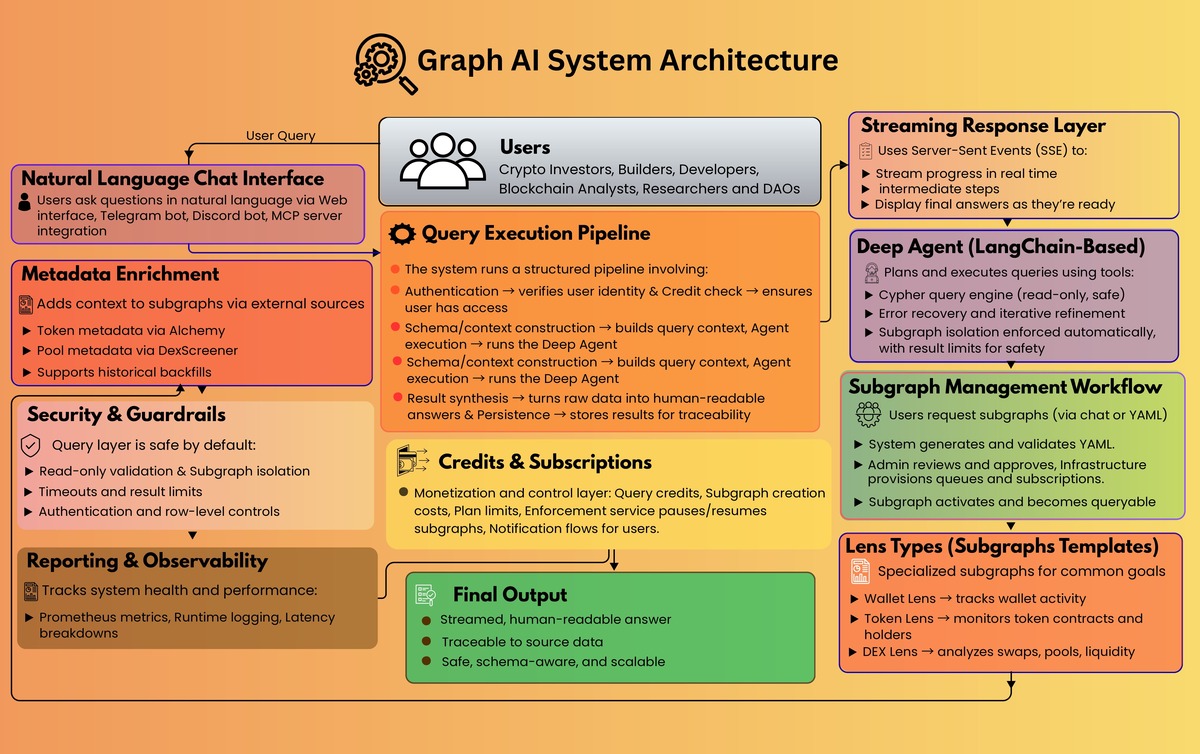
1) Query Execution Pipeline

When a user asks a question, the platform runs a structured pipeline: authentication, credit checks, dynamic schema and context construction, agent execution, result synthesis, and persistence. 

2) Streaming Responses (SSE)

Instead of making users wait for a single final answer, GraphAI streams progress in real time using Server-Sent Events, including status updates, intermediate agent steps, parallel tool executions, and the final response. 

3) Deep Agent (Tool-Based Reasoning)

At the core is a LangChain-based “Deep Agent” that can do multi-step planning, parallel execution, and iterative refinement when errors occur. 

The agent’s primary capability is a read-only Cypher execution tool with guardrails:

  • Blocks write operations (CREATE, MERGE, SET, DELETE, etc.)
  • Automatically enforces subgraph isolation
  • Limits results to keep queries safe and predictable

Subgraphs: From Request to Live Data

GraphAI isn’t just “chat over a database.” It includes an operational workflow for creating and managing subgraphs:

  • Users submit a request (natural language or YAML)
  • YAML is generated and validated
  • Admin review approves or rejects
  • Infrastructure provisioning creates queueing and subscriptions
  • The subgraph activates and becomes queryable

The system supports core on-chain event types (transfers, swaps, mints, burns, native transfers), plus configurable backfills for historical data.   

It also automatically enriches subgraphs with token and pool metadata via external sources (for example, token metadata via Alchemy and pool metadata via DexScreener). 

“Lens” Design: Purpose-Built Subgraphs

To make subgraphs easier to configure correctly, we implemented specialized lens types optimized for common analysis goals:

  • Wallet Lens: wallet-centric activity and monitoring
  • Token Lens: token contract activity and holder patterns
  • DEX Lens: pool activity, swaps, and liquidity behavior  

Platform Features That Make It Deployable

Credits and Subscriptions

GraphAI includes a built-in monetization and control layer (query credits, subgraph creation costs, and plan limits). 

A background enforcement service can pause and resume subgraphs automatically based on subscription status and limits, including notification flows. 

Multi-Channel Access

Beyond the web interface, GraphAI supports:

  • Telegram bot experiences (mobile-first querying)
  • Discord bot experiences (slash commands, mentions, rich embeds)
  • MCP server integration, exposing GraphAI tools to other AI applications

Observability and Reliability

The platform ships with Prometheus metrics, runtime logging, and latency breakdowns so the system can be tuned like a real production service. 

Security and Guardrails

GraphAI’s query layer is designed to be safe by default: read-only validation, enforced subgraph isolation, timeouts, result limits, authentication, and row-level controls. 

Outcome

GraphAI now has a modern foundation for “natural language blockchain analytics” that is:

  • Fast and understandable (streamed execution and synthesized answers)
  • Accurate by construction (subgraph isolation + schema-aware prompting)  
  • Operationally scalable (managed subgraph workflow, backfills, metadata enrichment)
  • Deployable as a business (credits, subscriptions, enforcement, notifications, bots, MCP)

From Sustainability Research to Decarbonization Plans

Impact

15 Rock wanted to scale decarbonization consulting without scaling headcount. This prototype compresses the slowest part of the workflow: turning scattered public and client data into a structured emissions and asset view, then producing a clear, defensible decarbonization plan with dashboards and a client-ready report.

Client overview

15 Rock is a sustainability consulting firm helping companies reduce carbon emissions while maintaining profitability. Their work requires analyzing operations, assets, and emissions drivers, then translating that into practical roadmaps.

The problem

15 Rock faced three bottlenecks:

  • Manual research: Collecting and summarizing company operations, assets, and emissions information across reports and sources was time-consuming.
  • Complex analysis: Effective strategies require linking emissions drivers to operational realities and financial constraints, not generic recommendations.
  • Limited scalability: Manual processes constrained the number of clients the team could support.

Goals

  • Build an AI prototype to automate research and accelerate analysis.
  • Support emissions and asset modeling to identify decarbonization opportunities.
  • Provide clear visualizations and a structured, client-ready report.
  • Keep the system modular for future expansion.

The solution

Krazimo built a prototype AI platform that streamlines 15 Rock’s consulting workflow:

  • Automated research: Collects and organizes information from public reports and documents.
  • Structured extraction: Converts unstructured disclosures into a usable fact base (assets, emissions signals, operational drivers).
  • Strategy generation: Identifies high-impact decarbonization levers tied to the company’s footprint.
  • Dashboards: Visualizes hotspots, assets, and recommended initiatives.
  • Report generation: Produces a structured plan that consultants can review and deliver.AI Report Generation for decarbonization

Architecture overview

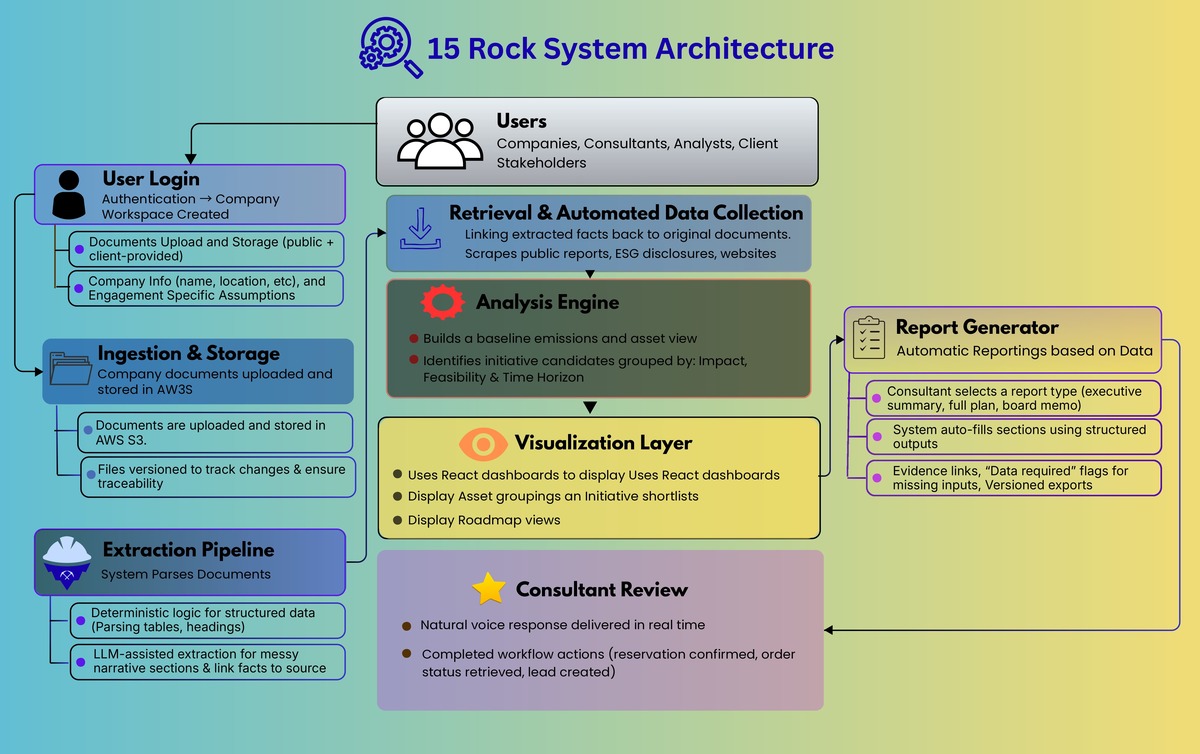
The prototype follows a “workspace-driven” architecture:

  • Company workspace: A single place to store documents, extracted facts, assumptions, analysis runs, and outputs.
  • Ingestion and storage: Public and client-provided documents are stored in S3 with versioned artifacts.
  • Extraction pipeline: Combines deterministic parsing (tables, headings) with LLM-assisted extraction for messy narrative sections, producing structured outputs.
  • Retrieval layer: A document retrieval component grounds recommendations and enables traceability back to sources.
  • Analysis engine: Builds baseline emissions and asset views, then proposes initiative candidates grouped by impact, feasibility, and time horizon.
  • Visualization layer: React dashboards for exploring hotspots, asset groupings, initiative shortlists, and roadmap views.
  • Report generator: Creates a template-based deliverable populated from structured outputs, includes evidence links, flags data gaps, and supports versioning.

How report generation works

  1. Consultant selects a report template (executive summary, full plan, board memo).
  2. The system auto-fills sections from the latest baseline, hotspots, and initiative shortlist.
  3. Major claims attach references to source material; missing inputs become explicit “data required” callouts.
  4. Consultant reviews, edits, and approves.
  5. The platform exports and versions the final report with input provenance.

Implementation snapshot

  • Backend: Python (FastAPI), serverless execution via AWS Lambda
  • Storage: AWS S3 for documents and generated artifacts
  • Frontend: React dashboards
  • Data collection: Web scraping from public sources
  • Delivery: Prototype completed in ~4 months, designed for iterative expansion