Why Access to Great Models Is Not Enough to Win in AI

One of the most common mistakes in AI strategy is assuming that success comes mainly from model quality. In this The Deep View piece, Krazimo CEO Akhil Verghese explains why that view is incomplete. The companies that lead in AI are rarely the ones that simply have access to strong models. They are the ones with the right combination of product direction, organizational urgency, technical talent, data strategy, and execution discipline. Without those pieces in place, even the most well-resourced companies can struggle to turn AI into meaningful product progress.

That lesson matters well beyond Big Tech. For enterprise leaders, the article is a reminder that AI transformation depends on far more than plugging a model into an existing workflow. Businesses need clear use cases, well-defined ownership, access to the right data, internal alignment on priorities, and the engineering maturity to turn experiments into dependable systems. AI strategy is ultimately a question of execution: how quickly an organization can move, how well it integrates AI into real workflows, and whether it can build systems people actually trust and use.

This is especially relevant for companies evaluating enterprise AI strategy, AI product execution, AI architecture decisions, and how to create long-term business value from AI investments. The real moat is rarely just raw model access. It is the ability to operationalize AI effectively inside a real product or business environment. That is why the article is such a strong match for Krazimo’s positioning around reliable AI systems, thoughtful deployment, and real-world business outcomes.

Read the full article on deepview.

Why AI Literacy and Governance Matter More Than Ever

As artificial intelligence becomes part of everyday work, many organizations are discovering that successful AI adoption depends on much more than choosing the right model or software. In this Education Week article, Krazimo CEO Akhil Verghese highlights a core issue that applies far beyond schools: employees are often already experimenting with AI tools, but leadership has not always provided the policy, guardrails, and structured support needed to use those tools safely and effectively. That gap creates risk. It can lead to inconsistent usage, weak oversight, unclear accountability, and avoidable compliance problems.

The broader lesson for businesses is clear. AI readiness is not just a technical problem. It is an organizational capability. Companies need teams that understand the basics of large language models, prompting, privacy, appropriate use, and human review. They also need leadership-level decisions about where AI should be used, what data it can access, when outputs require approval, and how success should be measured over time. In other words, real AI adoption depends on AI literacy, governance, training, and policy as much as it depends on software.

This is one of the most important shifts happening in enterprise AI right now. The companies that succeed will not just be the ones that buy tools first. They will be the ones that build an AI-literate workforce, define responsible usage clearly, and create repeatable systems for deploying AI in day-to-day operations. For any organization thinking seriously about responsible AI implementation, AI upskilling, enterprise AI governance, or workforce training for AI adoption, this article is a useful reminder that strong leadership and clear policy are becoming essential.

Read the full article here.

The Fundamentals of AI for Business: What to Automate, What to Protect, and How to Scale

Every week, a business owner somewhere hears that AI can automate their customer service, supercharge their sales pipeline, and transform their operations. And every week, some of those business owners spend tens of thousands of dollars on a solution that doesn’t actually work — because nobody told them the things that matter before you sign a contract.

Our CEO, Akhil Verghese, recently joined Tristan Harris on The Crawl podcast for an in-depth conversation about the fundamentals and ethics of AI in business. The discussion covers a lot of ground — from why Akhil left Google after six years to build Krazimo, to how companies should evaluate automation candidates, to the uncomfortable question of what happens to average performers in an AI-powered economy.

Here’s what business leaders need to know.

Why Akhil Left Google to Build Krazimo

The short version: at Google, the standards for AI reliability are extraordinarily high because any mistake ends up in the news. Akhil spent his final years there working within the Workspace organization on applying AI to specific problems, where the team developed strict techniques for reducing hallucinations, keeping AI on-topic, and preventing it from saying anything it shouldn’t.

When he started talking to people at other companies, he realized most of these techniques weren’t widely known — and they produced significant improvements in AI reliability for any enterprise willing to implement them. Companies started reaching out, asking how to get the same results. Google, to their credit, allowed him to consult on his own time. Within a year, the side business was making more than his Google salary. By July 2025, Krazimo was full-time.

The founding principle hasn’t changed: building AI solutions that are useful, deployable, repeatable, predictable, and reliable. Not demos. Not prototypes. Production systems that actually work.

The Scaling Problem Nobody Talks About

When software engineers think about scaling, they think about resources — servers, parallelization, infrastructure costs. AI introduces an entirely different dimension that most people miss: behavioral scaling.

How does your AI model behave as it encounters new edge cases? How does it respond to new data flowing in over time? Almost every useful deployed AI model involves feedback loops — the system learns and adjusts based on what happens. But what happens when policies change? When refund rules get updated? When a new product launches?

Akhil argues that people dramatically overemphasize the scaling costs of raw intelligence (which are dropping fast and will continue to drop) and dramatically underemphasize the real scaling challenge: ensuring your AI solution adapts gracefully to new data, new environments, and new feedback over time without breaking.

If you’re evaluating an AI vendor, ask them how their solution handles change. If they don’t have a clear answer, that’s a red flag.

Don’t Start with Solutions. Start with Problems.

This is the core operational insight of the entire conversation, and it’s worth reading twice.

The biggest mistake Akhil sees companies make when adopting AI is working backwards. They hear about an exciting AI capability — customer service automation, sales intelligence, lead scoring — and they try to bolt it onto their business without first asking whether it solves a problem that actually matters to them.

He gives a pointed example. A company doing a few million in annual revenue, converting 30% of their inbound leads with 30-40 leads per week, comes to him wanting to automate inbound sales. His response: why? The absolute best-case scenario is that an AI agent reduces that 30% conversion to 25% — because some people will always be annoyed by talking to a machine. The team is handling the volume fine. There’s no bottleneck here. The ROI is negative.

Compare that to an accounting firm getting 30 leads per week, where each lead requires significant manual research — looking up the company, checking revenue thresholds, verifying legitimacy, entering data into the CRM, sending follow-up emails, managing intake forms. That’s a perfect automation candidate: repeatable, well-defined, low-stakes per individual action, and genuinely time-consuming for humans. The AI does it at least as well as a human (probably better for routine research), it scales instantly, and freeing up human time for the high-value work of actually serving clients is a clear win.

The framework: Before you automate anything, define what success means in measurable terms. Calculate whether the math actually works. Identify whether this is a real bottleneck or just something that sounds cool to automate. Then act.

The 95% Trap: Why “Pretty Good” AI Is Often Useless

This might be the most counterintuitive point in the entire conversation, and it’s one that separates people who understand AI from people who’ve just seen demos.

Getting 95% accuracy on an AI task is relatively easy. Getting from 95% to 99% is where the real engineering lives. And in many business contexts, the difference between 95% and 99% is the difference between useful and worthless.

But here’s the key insight: whether 95% accuracy is useful depends entirely on what you’re automating.

If AI misqualifies 5% of your leads, nobody dies. The value of each individual lead is low. As the system improves from 95% to 99%, you proportionally benefit the whole way. The improvement curve is linear — every percentage point of improvement delivers incremental value.

If an AI radiologist is wrong 3% of the time, telling people they have cancer when they don’t (or worse, missing it when they do), it’s useless. There is no middle ground. The value curve is binary — it either meets the threshold for clinical reliability or it doesn’t.

The practical filter: When evaluating any automation candidate, ask yourself — is this a task where “pretty good” still provides real value? Or is it a task where anything less than near-perfect accuracy creates more problems than it solves? Automate the first category first.

Data Hygiene Is Not Optional — It’s the Foundation

Before any AI agent touches your business systems, you need to label everything clearly:

Is this data sensitive? Customer credit card information, medical records, personally identifying information — AI should never have unsupervised access to any of it. Full stop. Human-in-the-loop is mandatory.

Does this setting require human approval to change? Issuing refunds, modifying account details, accessing customer records — the guardrails here cannot be based on AI judgment. They must be deterministic, rule-based restrictions. If the only thing stopping your AI from doing something catastrophic is that nobody told it to, you’ve already lost.

What’s the blast radius if something goes wrong? For low-stakes actions (qualifying a lead, sending a follow-up email), full automation makes sense. For high-stakes actions (legal compliance, financial transactions, customer data access), human oversight is non-negotiable.

Akhil puts it memorably: a client once asked him, “What questions should I never ask my agent?” His response: “If you’re asking that question, you’ve already lost. The architecture should make it impossible for the agent to do anything harmful, regardless of what it’s asked.”

The Illusion of Competence: AI’s Most Dangerous Failure Mode

Here’s something that doesn’t get enough attention. When a human employee writes four paragraphs of marketing copy and the first three are excellent, you reasonably assume the fourth will be good too. That’s how human competence works — it’s generally consistent.

AI doesn’t work that way. Three perfect paragraphs tell you nothing about the fourth. Each output is an independent prediction. The confidence and fluency of AI writing creates what Akhil calls an “illusion of competence” — and it’s especially dangerous when businesses delegate review tasks to people who develop unwarranted trust based on a track record that doesn’t actually exist.

This is an ethics issue, not just a quality issue. If your clients trust your firm’s expertise, and you’re delegating work to AI without adequate review, you’re trading on a reputation your AI didn’t earn. The solution isn’t to avoid AI — it’s to build review processes that account for how AI actually fails.

What the Next Three Years Look Like

Akhil’s outlook is both optimistic and grounded. He expects models to continue getting incrementally better — cheaper intelligence, fewer hallucinations, better self-correction through reflection loops. He points to Claude Code as an example of what happens when brilliant engineering is layered on top of already-good models: the coding tool works not because the underlying model is perfect, but because the verification and correction loops around it are excellent.

He expects that pattern to expand into other fields — law, medicine, accounting — as similar effort gets invested in domain-specific reflection and correction systems.

The human impact is harder to predict. Akhil is direct about this: the age of AI will disproportionately reward excellence. If your work is genuinely exceptional — the best writing, the best strategic thinking, the deepest expertise — your job is safe for the foreseeable future. If your work is average and entirely task-based, the economics are moving against you. The advice isn’t to fear AI — it’s to invest in becoming genuinely great at something you care about, and to use AI as the tool that amplifies that excellence rather than replaces it.

Where to Start

If you’re a business owner who’s been hearing about AI for months but hasn’t taken the first step, here’s the simplest possible action plan:

  1. Talk to your team. Find out who’s already using AI tools. Their use cases are your best candidates for formalized automation.
  2. Pick one workflow that’s high-volume, well-defined, and low-stakes per individual action. Lead qualification is usually the best starting point for service businesses.
  3. Define success numerically before you build or buy anything. Conversion rate, response time, error rate — whatever matters for that specific workflow.
  4. Label your data and settings. Mark what’s sensitive, what needs human approval, and what can be fully automated.
  5. Deploy in phases. Shadow launch first, human-in-the-loop second, full automation only after the system has proven itself over a meaningful period.

The companies seeing real ROI from AI right now all followed some version of this path. The ones still waiting are watching the gap widen.

Watch the whole interview at https://www.youtube.com/watch?v=9bVZAxMljn8

Ethical AI Automation: Where Human Judgment Still Matters (And Where It Doesn’t)

If you run a business right now, you feel it. AI is everywhere. Automation promises are everywhere. And you’re asking yourself the same question every other business owner is asking: am I behind — or am I about to make an expensive mistake?

Our CEO, Akhil Verghese, recently sat down with Stacy on The Authority Business Show to answer exactly that question. The conversation covered the practical reality of AI automation for business owners — not the hype, not the theoretical possibilities, but the actual steps you should take this week if you want to use AI without losing control of what matters most.

Here are the key takeaways.

AI Is Making Businesses Faster — Not Necessarily Smarter (Yet)

One of the first distinctions Akhil draws is between speed and intelligence. Right now, most productive AI solutions in the real world are focused on automating existing workflows — doing what already works, but doing it faster and more consistently. Very few businesses are using AI to generate genuinely new ideas or creative strategies. That’s still firmly in the domain of human leadership.

This matters because it shapes how you should think about your first AI investment. You’re not buying a replacement for your best strategic thinker. You’re buying a way to handle the repetitive, high-volume work that’s eating up your team’s time.

Before You Automate Anything: Two Steps You Can’t Skip

Akhil’s number one piece of advice for any business owner considering AI is deceptively simple: before you automate, evaluate and structure.

Step 1: Define your metrics. Take the specific workflow you want to automate — say, responding to leads from Instagram ads — and look at how it’s performing right now. What’s your conversion rate? What’s your average response time? What does success actually look like in numbers? Without this baseline, you’ll never know whether your AI is helping or hurting.

Step 2: Label your data and settings. Go through everything the AI would need access to and clearly mark what’s sensitive, what requires human permission to change, and what can be fully automated. You don’t want an AI agent issuing $1,000 refunds to angry customers or using your business credit card without oversight. These boundaries need to be hard-coded, not left to the AI’s judgment.

The Real-World Math: When AI Lead Conversion Makes Sense

Here’s where the conversation gets specific — and directly relevant if you’re running a service business.

Akhil shares a concrete example from a cosmetology practice (think med spas, Botox, aesthetic services). When someone clicks an Instagram ad for Botox and an AI agent responds within 60 seconds instead of the typical 30 minutes to 2 hours, the results are dramatic. Studies show response rates can increase by 20x to 50x when contact happens within a minute. For a business like a med spa in a competitive market, where a potential client has 20 other options within a few minutes, that speed difference translates directly into booked appointments and revenue.

But here’s the nuance: the same approach applied to a real estate company produced very different results. Why? Because someone looking at a multi-million dollar property is willing to wait two hours for a response. Speed matters enormously for low-consideration, high-competition services. It matters much less when the purchase decision is inherently slow.

The takeaway for service businesses: If you’re in an industry where response time is the competitive battleground — home services, med spas, legal consultations, any appointment-driven business — AI lead conversion is likely your highest-ROI first automation. If you’re selling something where customers naturally take their time, look elsewhere first.

The Biggest Red Flag: Falling for a Cool Demo

Akhil is blunt about the most common mistake he sees: businesses falling for impressive demonstrations that bear no resemblance to production-ready solutions.

The problem is structural. It’s incredibly easy to get 85-90% of the way to a working AI solution. But in many business contexts, 85% accuracy is effectively useless — because if you’re correcting things one in ten times, you need to be just as vigilant as if you were doing everything manually. And the consequences of confidently wrong AI output are often worse than no output at all.

The gap between a cool demo and a reliable, deployable agent is typically tens of thousands of dollars and months of careful work. On day one, you look 80% of the way there. Then it takes five months to reach the 96% accuracy threshold you actually need for production.

What AI Can’t Replace: Agency, Creativity, and Accountability

The conversation turns to something many business owners quietly worry about: what can’t AI do?

Akhil’s answer is clear. AI is exceptional once you know what needs to be done. It makes the process of getting there dramatically more efficient. But figuring out what to do — the strategic vision, the creative spark, the leadership decisions — that’s still entirely human territory. He has never had an AI, even with significant autonomy, independently identify a problem worth solving that he wasn’t already working on.

And on the accountability front: no computer can be held accountable for its decisions. Someone in your organization needs to own the outcomes of any automated process, and Akhil recommends that person be the manager of whoever was doing the task before — they’re the most incentivized to get it right, and they’re already accountable for results in that area.

The Three-Step Rule for Adopting AI

For business owners who want a simple framework, Akhil offers three steps:

1. Talk to your employees. The best automation ideas almost always come from the people doing the work. They’re already using AI in ways that might surprise you. Listen to them, involve them in the process, and let ideas bubble up from the bottom.

2. Evaluate before you deploy. Define what success looks like. Understand the current workflow in detail. Identify every point where things could go wrong. Then decide whether to build internally or hire external expertise.

3. Set guardrails, monitor continuously. Every AI deployment needs hard limits on what it can access and do. And those limits need to be monitored — not just for a few days after launch, but permanently. If your conversion rate drops below a threshold for three consecutive days, you need an automatic alert.

What Should You Do This Week?

If you’re a business owner listening to all of this and feeling overwhelmed, Akhil’s advice is simple: start small, but start now.

The companies that have already adopted AI and worked through the early mistakes are now seeing real, measurable upside — real revenue increases from real agents deployed in real workflows. The gap between them and companies that haven’t started is widening. The biggest mistake you can make right now isn’t deploying AI badly. It’s keeping your workforce AI-illiterate.

Pick one simple, repeatable workflow. Define what success looks like. Set clear guardrails. Deploy it. Monitor it. Learn from it. Everything else will follow.

Watch the full interview at: https://www.youtube.com/watch?v=pwcSPE0Rwz8

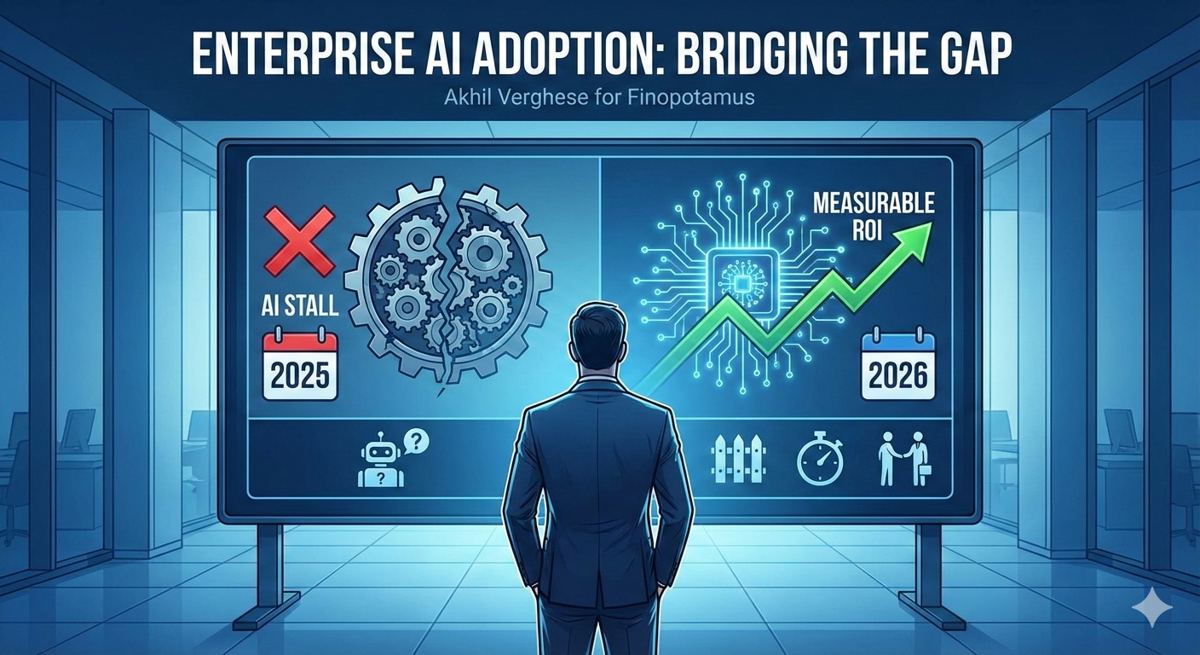
Why Most Enterprise AI Projects Fail — And How to Ensure Yours Doesn’t in 2026

Krazimo CEO Akhil Verghese writes for Finopotamus on why enterprise AI adoption stalled for many companies in 2025 and what business leaders need to do differently to achieve measurable AI ROI in 2026. The editorial examines the gap between AI demos and production-ready enterprise AI solutions — a recurring theme in failed AI agent deployments across industries including financial services, insurance, and healthcare.

The piece draws on Gartner’s prediction that over 40% of agentic AI projects will be canceled by 2027, and argues that the root cause is not the technology itself but a lack of governance, testing, and clearly defined success metrics before deployment. Verghese outlines a practical AI implementation framework built on three principles: fencing AI agents into narrow, well-defined workflows; tying agent performance to explicit quantitative benchmarks; and defining clear escalation paths for human-in-the-loop oversight.

The article also offers a forward-looking estimate that 15–20% of enterprises will demonstrate real ROI from AI agents by the end of 2026, with enterprise-scale AI adoption reaching near-100% before 2030. For CTOs, VPs of Engineering, and operations leaders evaluating AI consulting partners, the editorial provides a vendor evaluation checklist: structure payments around measurable outcomes, baseline current human performance before onboarding any AI solution, and adopt phased launch strategies — from shadow launches to supervised automation to full deployment.

This is essential reading for any enterprise leader developing an AI strategy, evaluating AI consulting firms, or building a business case for deploying multi-agent systems and intelligent automation within their organization.
Read the full editorial on Finopotamus →

How Our AI CRM Gets People Their Botox

Client Overview

Dr. Jason Emer runs a busy, high-end aesthetic medicine practice in Beverly Hills. Patients reach the clinic every way imaginable — the website, phone calls, texts, email, in-person visits, and a very active Instagram. The goal was to grow without losing the premium, personal experience that keeps patients coming back.

The Problem

Fast growth created friction the team felt every day:

  • Conversations were scattered across Salesforce, phones, email, and Instagram, with no single place to see them.
  • Context was hard to find — past calls, old quotes, appointment history, notes, consent status.
  • Leads slipped through the cracks, especially when no one replied in time.
  • Calls were recorded but not useful without someone listening back and writing them up.
  • Instagram was overwhelming — patient messages often went answered late, or not at all.
  • The clinical and business systems didn’t talk, so staff couldn’t act quickly or consistently.

Goals

  • Give staff one place to run everything: leads, accounts, messages, scheduling, notes, consents, and reporting.
  • Make every conversation searchable — calls, texts, email, and social.
  • Stop losing leads with simple rules and alerts.
  • Automate the front door of patient discovery — especially Instagram — while staying on-brand.
  • Fit around the tools they already use, instead of ripping everything out.

The Solution

We built two systems that work as one:

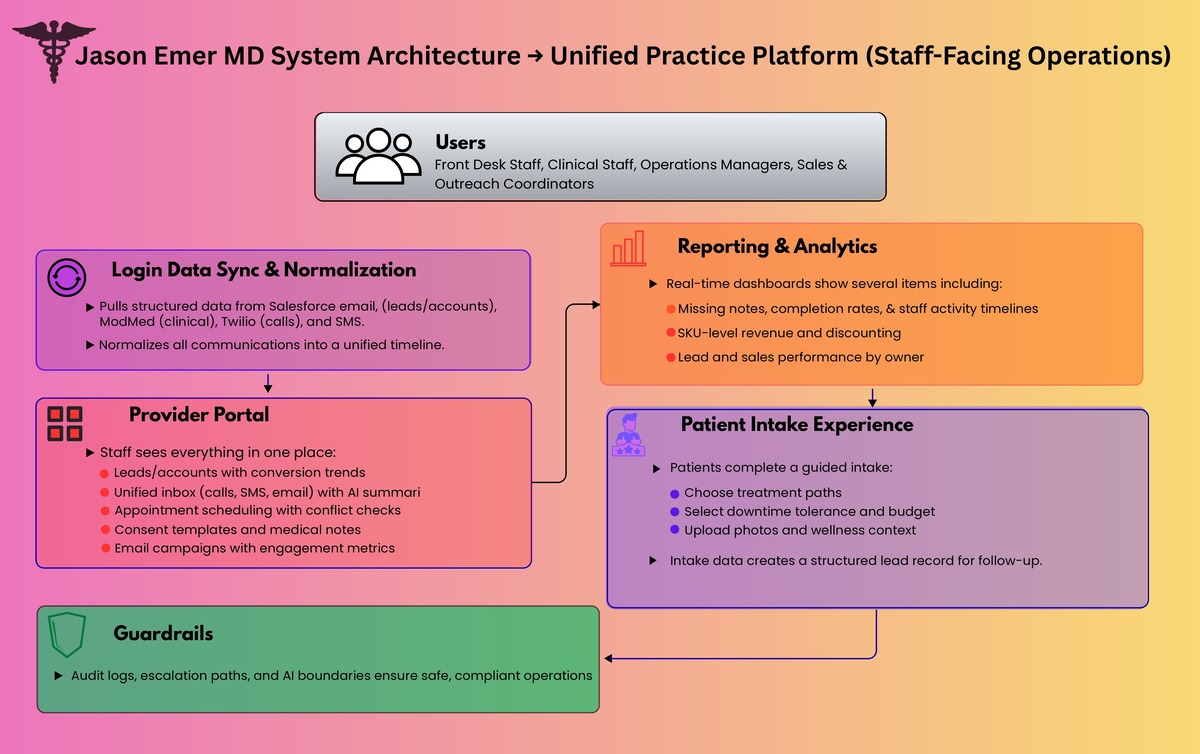
  1. A unified practice platform — one place for staff to run the business, plus a guided patient intake.
  2. An AI concierge for Instagram and live chat.

Together, they turn scattered interest into organized intake, timely follow-ups, and a clear view of what’s working.

medical CRM automated CRM practice management patient intake lead management clinic software healthcare CRM patient messaging appointment scheduling call transcription

Solution 1: The unified practice platform

What the team sees: one place to run the business

Leads and accounts. Leads and patients sync in from Salesforce and appear in views built for the clinic — leads by owner, conversion trends, and top procedures. A “no-cracks” layer flags any lead that hasn’t been contacted within a set window (say, 3 to 12 hours) so a manager can step in.

One inbox for every conversation. Texts, calls, and email history all land in a single view. Calls come with transcripts and short AI summaries, so staff can read what happened instead of digging through recordings.

Email campaigns. Staff can send outreach right from the platform and see sends, opens, and replies.

Operations. Scheduling that respects real-world constraints (like avoiding same-day appointments across town), reusable consent forms with completion tracking, patient notes, and pre-visit instructions sent ahead of each appointment type.

Reporting. A reports layer answers the urgent questions fast — like which notes are missing for a given period, and completion rates by status and owner.

Analytics. One dashboard shows what’s actually driving the business: performance by product and treatment, discounts and why they were given, each team member’s activity, and lead and sales trends by owner and time. Not generic charts — views built for how a clinic really runs.

What patients see: a guided intake

We built a branded intake flow that gathers the right details without feeling like a long form. A patient can:

  • choose one of two paths
  • point to focus areas on an interactive body map
  • set how intense a treatment they want, and how much downtime they’ll accept
  • share the basics (budget range, sensitivity, skin type)
  • add wellness context if it’s relevant
  • upload photos for context
  • submit — which creates a lead for the team to follow up
call summaries Instagram DMs Instagram automation AI concierge chat automation Salesforce integration ModMed integration Twilio integration unified inbox patient follow up lead tracking

Solution 2: The AI concierge for Instagram and chat

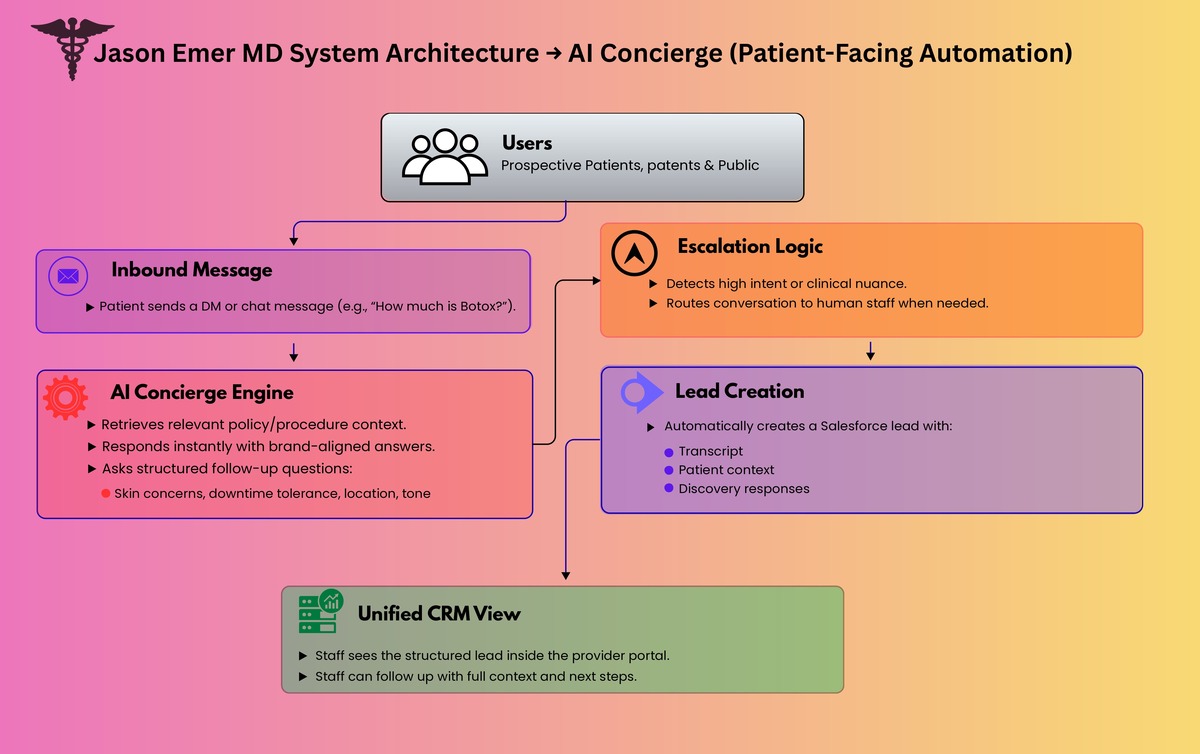
Instagram is where modern aesthetic practices meet new patients — and it’s brutal to keep up with at scale. The concierge can:

  • answer common questions instantly
  • guide a patient through a real discovery conversation
  • ask the right follow-ups (skin concerns, downtime, skin tone, location, and so on)
  • stay in the practice’s premium, patient-first voice
  • hand off to a person the moment things get high-intent or clinically sensitive
  • create a Salesforce lead automatically when a patient asks to be contacted

That turns Instagram from a bottomless inbox into a real, qualified pipeline — with the context already attached.

Architecture Overview

Here’s how the pieces fit together, end to end.

1) The systems of record

  • Salesforce as the backbone for leads, accounts, quotes, and ownership
  • ModMed — their electronic health-records system — as the clinical source of truth
  • Twilio (or similar) for phone calls and recordings
  • ManyChat (or similar) as the Instagram gateway

2) Bringing it all together

  • A scheduled sync pulls new Salesforce and operational records into the platform
  • Calls, texts, and email are organized into one consistent timeline
  • Clinical context is added where it helps, to give staff a fuller picture

3) The AI behind the scenes

  • For calls: recording → transcript → who-said-what → summary → filed against the patient
  • For chat: message → pull the right policy or procedure info → draft a reply → deliver it safely → log the transcript → create a lead when it makes sense

4) What people actually use

  • The staff portal for running operations and reading the analytics
  • The patient intake that organizes demand before it reaches the team

5) Guardrails

  • A full audit log of every interaction
  • Clear limits on what the AI is allowed to say
  • A human handoff whenever it’s needed

Results and Impact

The numbers the practice saw:

  • 15–20% more new leads, plus a 15% lift in conversion — attention on the web and social now turns into booked patients.
  • 30% less labor time through automation — no more manual chasing, logging, and re-listening.

And in day-to-day terms:

  • Minutes, not hours to understand a call, thanks to transcripts and summaries.
  • Under a minute to respond on busy social channels, so attention turns into a real patient journey instead of a stalled message.
  • Fewer lost leads, with alerts and manager visibility by owner and team.
  • One clear system for appointments, consents, notes, and reporting.
  • Better decisions, with revenue, product performance, discounts, and sales trends all in one place.

“What stood out most was their combination of speed, efficiency, and absolute transparency.”

— Head of Marketing, Jason Emer, MD · ★★★★★ Clutch review

Why It Worked

This wasn’t AI bolted onto a CRM. It was an operating-system approach:

  • bring the clinic’s whole reality into one place — calls, texts, email, Instagram, scheduling, notes
  • turn messy conversations into clear next steps
  • keep Salesforce and ModMed as the systems of record, but finally make them usable day to day
  • automate where it removes busywork, not where it adds risk

Krazimo helped Dr. Jason Emer’s practice grow patient engagement without losing the premium feel. By pairing one unified platform with an AI concierge that can handle a flood of inbound demand, the clinic gets faster responses, cleaner follow-ups, and real operational control — without ripping out the tools it already relied on.


Let the Phones Run Themselves!

Impact

  • Fully automated the “basic questions” layer across industries, so routine calls no longer require staff time.
  • Human involvement dropped as low as 2-3% for businesses with simple, repeatable workflows such as restaurants.
  • Consistently faster responses and fewer missed calls, because the agent can answer immediately, every time, including after hours.

The problem

Most businesses still run on phones. Reservations, order status, lead intake, scheduling, and support all come through voice. But traditional phone automation is either rigid (IVR trees) or fragile (scripts that break the moment a customer says something unexpected). Modern voice AI is powerful, but adoption fails for three predictable reasons:
  1. Businesses do not just need a voice. They need actions: bookings, lookups, updates, routing, and follow ups.
  2. Telephony is a real stack: phone numbers, routing, call logging, and reliability are non negotiable.
  3. Every business has slightly different workflows, so generic agents collapse in the details.

Our Solution

The key idea

Voice AI becomes valuable only when it is deployed as a workflow engine, not a talking demo. Blink Concierge was built to make voice agents act like trained staff members by combining:
  • Telephony native infrastructure
  • A workflow and tool calling layer
  • A model agnostic voice layer
  • White glove deployment for real integrations and edge cases
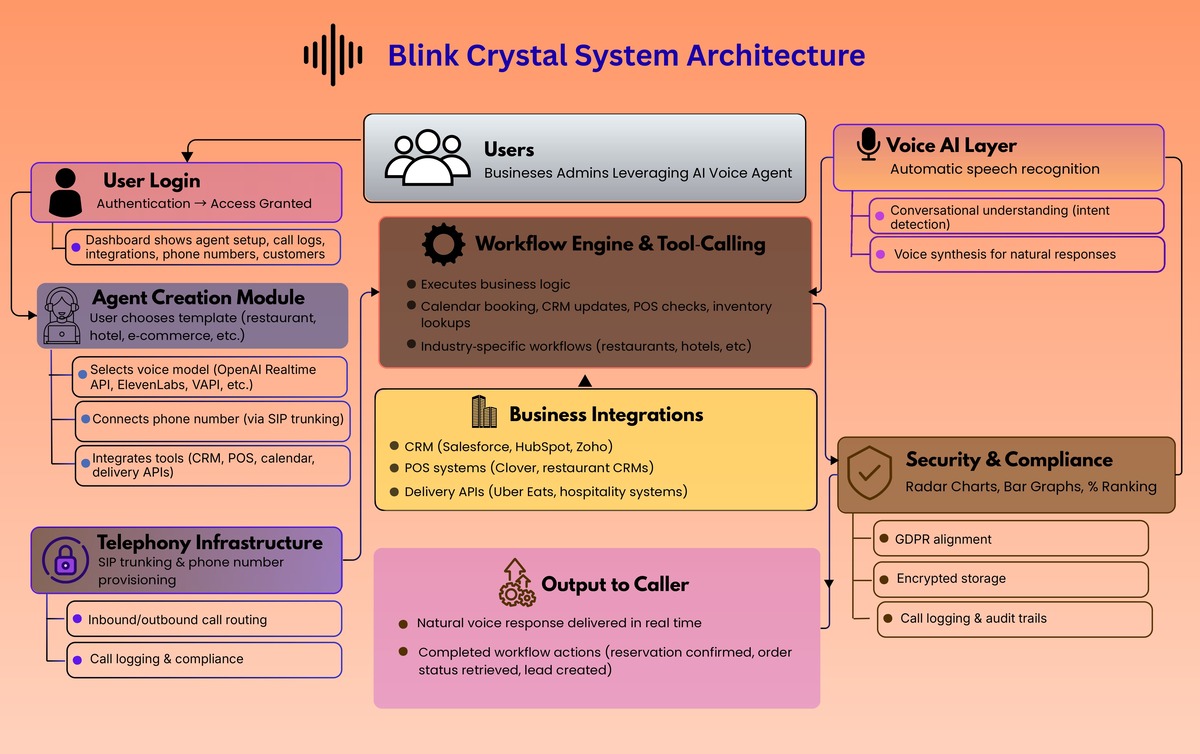
Blink Concierge is a platform to create and deploy AI voice agents that can be assigned to real phone numbers, handle inbound calls, and execute business workflows. Under the hood, the platform includes an operator console (BlinkCrystal) that supports:

What We Built

  • Contact management and call initiation
  • Agent creation and configuration (prompt plus first message as the core primitive)
  • Phone number provisioning and assignment of an agent to a number
  • Call history with transcript, summary, and recording
Final Review page 0003

Architecture overview

The system breaks into four layers that work together.

1) Telephony layer

This is the foundation. The platform provisions phone numbers, routes inbound calls to the right agent, and captures call artifacts (recordings, transcripts, summaries). This is what turns “AI voice” into an actual business phone system.

2) Agent layer

Agents are defined as configurable entities with:
  • A system prompt that encodes role, policy, and workflow behavior
  • A first message that sets tone and call opening behavior
This makes it fast to create agents for specific jobs such as reservation handling, order handling, lead intake, and support triage.

3) Workflow and tool calling layer

This is the differentiator. The agent is not only conversational. It can trigger actions such as:
  • Creating reservations or appointments
  • Updating CRM records
  • Looking up order status
  • Routing or escalating calls
  • Capturing structured intake data for follow up
This layer is also where industry specificity lives. Restaurants, hotels, funeral homes, real estate, and e commerce all share the same primitives, but differ in workflows, integrations, and escalation rules.

4) Model agnostic voice layer

The platform is designed to support multiple voice providers, so clients can choose based on realism, latency, cost, or vendor preference, without rewriting workflow logic. The agent logic stays stable while models evolve.

How it works end to end

Flow A: Create and deploy an agent

  1. Create an agent (prompt plus first message)
  2. Assign it to a phone number
  3. Turn on routing so inbound callers reach the agent instantly
  4. Review call history artifacts to iterate quickly

Flow B: Run calls as workflows

  1. Caller states intent in natural language
  2. Agent identifies the workflow path
  3. Agent executes tool calls (book, look up, create, update)
  4. Agent confirms outcomes and closes the loop
  5. Platform stores transcript, summary, and recording for QA and training

Flow C: Human in the loop only when needed

Blink Concierge is designed to automate routine questions completely, then escalate only when:
  • A workflow falls outside the configured policy
  • The caller request is ambiguous or sensitive
  • A tool call fails or requires human judgment
That is how human involvement can drop to 2 to 3 percent for simple businesses like restaurants, while remaining higher for industries with complex or high risk edge cases.

Where it shines

  • Restaurants: reservations, pickup and delivery status, menu questions, hours, basic routing
  • Hospitality: after hours requests, basic service routing, simple bookings
  • E commerce: order lookup, shipping status, returns initiation, ticket creation
  • Real estate: lead qualification, scheduling, routing to agents
  • Sensitive industries: structured intake plus careful escalation policies

What makes it different

Most voice products stop at “make the model talk.” Blink Concierge treats voice as the top layer of an automation stack: telephony reliability, workflow execution, integrations, and deployment support. That is why it can fully automate handling user requirements in production, not just in a demo.  

A Practical Guide to Evaluating AI Agents for Enterprise Deployment

Krazimo CEO Akhil Verghese sits down with TMCnet to discuss one of the most pressing challenges facing enterprise technology leaders today: how to rigorously evaluate AI agents before trusting them with business-critical workflows. The conversation addresses the fundamental trust deficit that exists between the promise of agentic AI and the reality of deploying autonomous systems in production environments.

Verghese explains why traditional software evaluation methods fall short when applied to AI agents. Because large language models produce non-deterministic outputs, enterprises need new testing frameworks that go beyond standard QA. Krazimo’s approach — grounded in the same engineering rigor Verghese practiced during six years as a senior software engineer at Google — centers on deterministic workflow design, modular agent architecture, and robust evaluation pipelines that measure accuracy, consistency, and edge-case handling before any agent touches live data.

The interview covers Krazimo’s phased deployment methodology: starting with shadow launches where the AI operates in parallel with human workers, progressing to human-in-the-loop validation where the agent performs the task but a human approves the output, and only moving to full automation once performance matches or exceeds human baselines over a sustained period. This approach applies across use cases — from AI-powered CRM automation and customer service bots to intelligent document processing and multi-agent orchestration systems.

For enterprise buyers evaluating AI development agencies, AI consulting firms, or building internal AI capabilities, Verghese provides a clear framework: demand outcome-based contracts, insist on phased rollouts with measurable checkpoints, and treat any vendor who skips testing and governance as a red flag.

Read the full interview on TMCnet →

Gamifying Sales Training

Impact

  • Faster ramp for new reps by letting them simulate dozens of realistic calls before they speak to a real customer.
  • Higher win rates driven by stronger discovery and objection handling, reinforced through repeatable practice and feedback loops.
  • Scalable coaching without manager burnout, because the platform automates analysis and surfaces gaps instead of relying on manual review.

Client overview

PitchMee is an AI driven sales training and performance platform built for high velocity teams, combining simulation, peer roleplay, and real meeting analysis into one system. 

The problem

Sales teams have a training problem that most tools never solve:
  • Practice is inconsistent, hard to schedule, and rarely feels like real buyer pressure.
  • Feedback is often subjective, delayed, or based on too small a sample of calls.
  • Managers cannot realistically coach every rep while also running the sales pipeline.
  • Real sales calls are where deals are won or lost, but they often go unreviewed at scale.

Goals

  • Create a training loop that is interactive, not slide based.
  • Make coaching measurable, not vibes based.
  • Give managers team wide visibility without needing to listen to everything.
  • Let teams practice in multiple modes: AI simulations, peer roleplays, and real meeting intelligence.

The solution

PitchMee is built around three reinforcing systems:
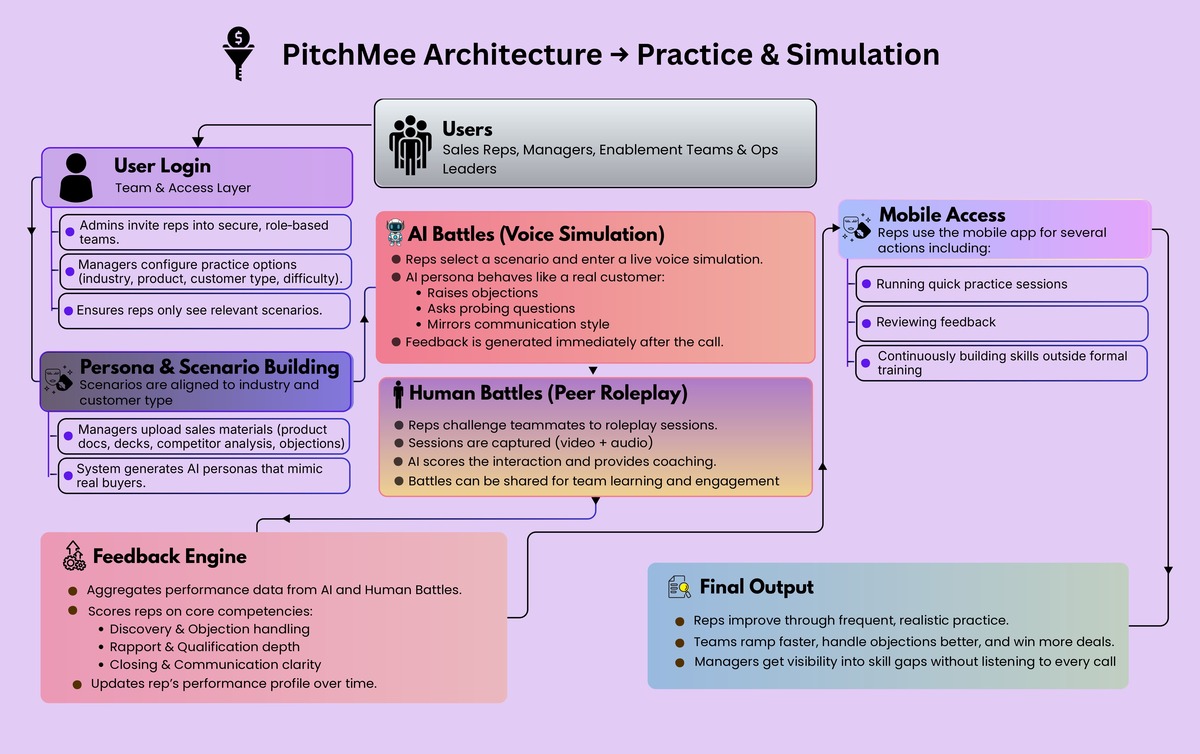
  1. AI Battles: simulated voice calls where reps pitch to an AI persona acting as a real customer, including objections and industry specific behavior.
  2. Human Battles: peer to peer roleplay captured as video and audio, then scored with AI generated coaching.
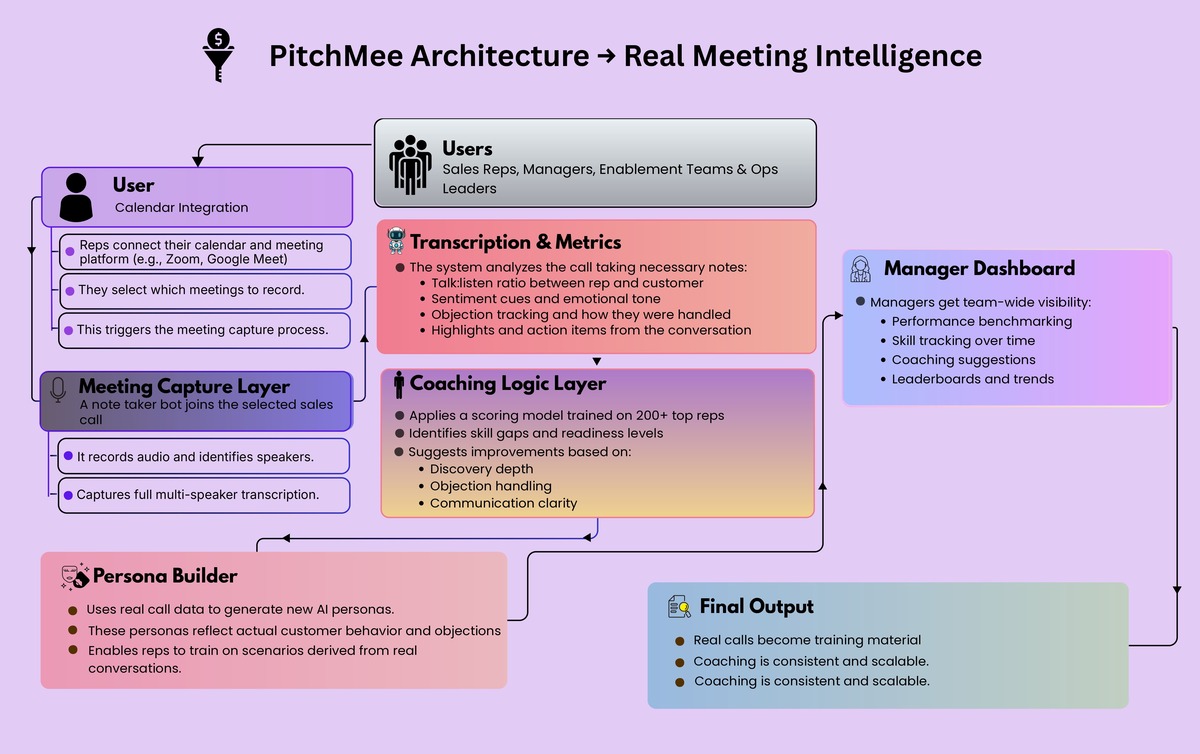
  3. Meeting Analysis: a note taker joins real sales calls, records them, and produces transcripts, scores on talk:listen ratio, highlights, sentiment cues, and objection tracking.
Together, this turns sales training into something reps actually use to learn and get better, and something managers can track.

How it works end to end

Flow A: AI Battles

  1. Rep selects a scenario configuration (industry aligned presets, customer type, difficulty).
  2. Rep enters a live voice simulation with an AI buyer persona.
  3. After the call, PitchMee generates feedback and updates the rep’s performance profile over time.

Flow B: Human Battles

  1. A rep challenges a teammate to a roleplay based on a chosen configuration.
  2. The battle is captured (video and audio), then scored and reviewed with AI generated coaching.
  3. Battles can be shared within the team for lightweight engagement and learning culture.sales training AI sales coaching sales roleplay sales call coaching sales enablement sales coaching software call recording analytics conversation intelligence objection handling training sales onboarding

Flow C: Real meeting analysis

  1. User connects calendar and meeting system, and selects meetings to record.
  2. Note taker joins and records the call.
  3. PitchMee produces transcript, metrics, highlights, sentiment cues, and objection handling guidance.
  4. Managers can use real calls to generate new training personas, turning actual field conversations into repeatable practice.sales training AI sales coaching sales roleplay sales call coaching sales enablement sales coaching software call recording analytics conversation intelligence objection handling training sales onboarding

Architecture overview

PitchMee is best understood as five layers:

1) Team and access layer

  • Invite only teams, with role based access (admins can see both manager and user experiences; members focus on practice).
  • Team level configuration that controls what practice options are available (industry, product categories, customer types, difficulty presets).

2) Real time voice simulation layer

AI Battles are voice first (not chat). Under the hood, PitchMee uses the OpenAI Realtime API so the AI can behave like a buyer in a live conversation: asking probing questions, challenging assumptions, raising objections, and mirroring communication styles. 

3) Persona and scenario building layer

Managers can build custom AI personas for their teams by uploading materials like product docs, sales decks, competitor analysis, and objection lists. The system then constructs a persona that understands the product, mimics the buyer, and adapts based on rep responses. 

4) Meeting capture and analysis layer

For real calls, PitchMee inserts a note taker into sales meetings and generates:
  • multi speaker transcription
  • rep vs customer talk time separation
  • talk to listen ratio scoring
  • highlights and action items
  • sentiment and tonal cues
  • objection tracking and suggested improvements
This is strengthened by coaching logic informed by a partner organization with 200 plus top performing reps, embedded into the coaching engine. 

5) Feedback, dashboards, and mobility

  • A feedback engine that scores core competencies such as discovery, objection handling, rapport, qualification depth, closing, and communication clarity, with results aggregated over time.
  • A manager dashboard that consolidates battles, meetings, benchmarking, skill scoring, trend analysis, leaderboards, and coaching suggestions.
  • A mobile app so reps can run quick practice sessions, review feedback, and build skill continuously, not quarterly.

Results

In early deployments, PitchMee has delivered:
  • Faster onboarding and ramp for new reps.
  • Higher win rates driven by improved discovery and objection handling.
  • Consistent coaching at scale with reduced manager load.
  • More confident teams and healthier learning culture through frequent practice and peer competition.

Lessons learned

  • Voice based simulations create more realistic pressure and better learning than text prompts alone.
  • Coaching must be structured and data driven to scale beyond a single great manager.
  • Short, frequent practice changes behavior faster than occasional training workshops.

Conclusion

PitchMee brings AI simulation, peer roleplay, and real meeting intelligence into one training loop that is measurable, repeatable, and manager friendly. Reps get a realistic place to practice and improve. Managers get high fidelity visibility into skill gaps and readiness. And sales orgs finally get a scalable way to raise performance without burning coaching bandwidth.   

A Research Assistant That Actually Runs The Work

Client overview

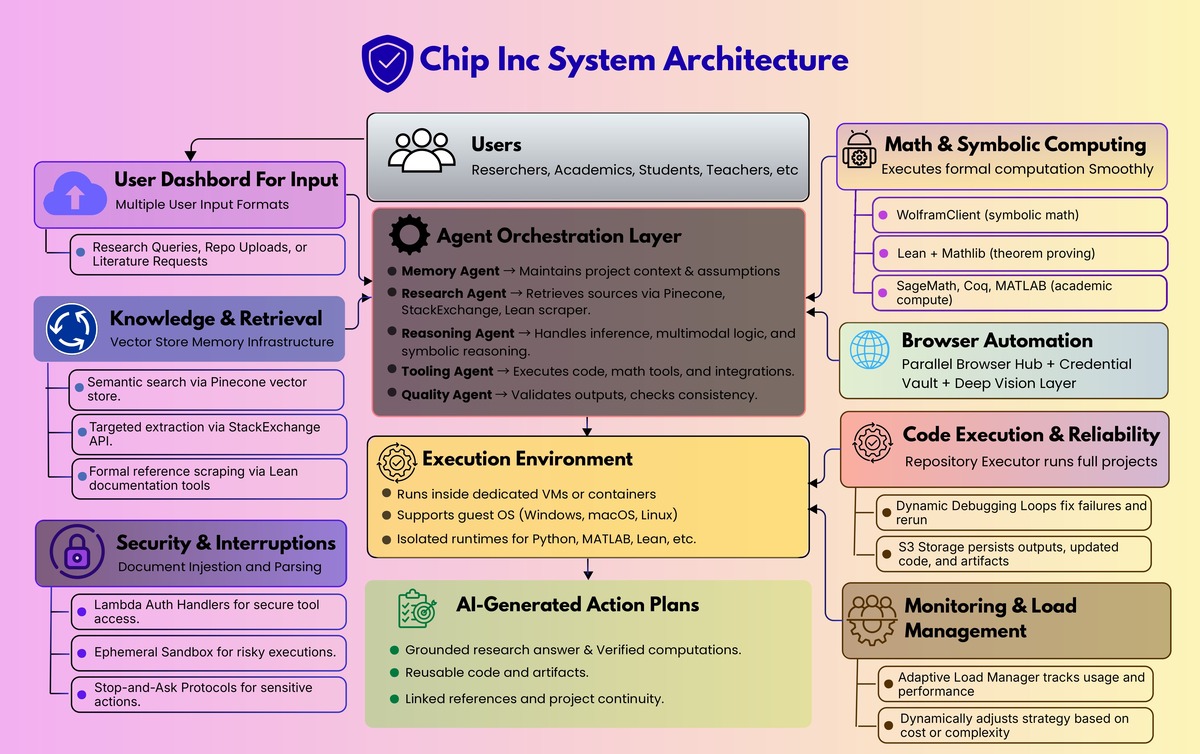
Chip Inc is building an AI powered research assistant for academics. The goal is simple to state and hard to ship: help researchers move faster by automating the tedious parts of research while still supporting serious computation and reproducible workflows.

The problem

Academic research has a hidden tax that steals time from actual thinking.
  • Manual data work eats hours: gathering sources, cleaning data, extracting tables, rewriting code, rerunning experiments.
  • Computation is fragmented: researchers bounce between Python, MATLAB, symbolic tools, notebooks, and web tools, often with painful setup and dependency issues.
  • Tools lack project memory: most assistants answer a question, then forget the project context and assumptions that make research coherent.
  • Safety and control matter: autonomous actions such as credentials, external tools, and code execution need guardrails, not blind automation.

Goals

  • Build an AI research bot tailored for academic workflows, not generic chat.
  • Enable real execution, including advanced interpreters and symbolic math tooling.
  • Support end to end research pipelines: retrieval, computation, drafting, and iteration.
  • Keep the system modular so new tools and workflows can be added without rewriting the core.

The solution

Krazimo partnered with Chip Inc to build a modular “research executor” that combines:
  • A conversational interface for research queries and planning
  • A multi agent orchestration layer for retrieval, memory, reasoning, and verification
  • A controlled execution environment for running code, math tools, and workflows
  • A browser automation subsystem for parallel research and action steps
  • A security and interruption framework so autonomy remains user controlled
In other words, it is not a chatbot. It is a research assistant that can retrieve, run, verify, and iterate. AI research assistant agentic AI research automation AI workflow automation AI code execution browser automation AI AI with memory AI tool calling symbolic math AI theorem proving AI

Architecture overview

1) Core agent orchestration

At the center is an orchestrator that plans work, delegates to specialists, and compiles the final output:
  • Orchestrator Agent: coordinates the plan and compiles the final answer
  • Research Agent: retrieval and knowledge gathering
  • Memory Agent: project context, assumptions, continuity
  • Reasoning Agent: advanced inference plus multimodal reasoning
  • Quality Agent: testing, verification, consistency checks
  • Tooling Agent: tool execution and integrations
This separation is what lets the system stay robust as capabilities expand. Each agent has a clear job, and the orchestrator keeps the overall task coherent.

2) Knowledge and retrieval that supports real research

The research assistant needs to cite and ground itself.
  • Pinecone vector store for semantic retrieval
  • StackExchange API for targeted technical knowledge extraction
  • Lean documentation scraper for pulling authoritative references when formal reasoning gets specific
The goal is to reduce time lost to searching and keep responses anchored in retrievable sources.

3) Math and symbolic computing as first class tools

A core requirement for academic users is being able to execute formal and mathematical work.
  • WolframClient for symbolic computation
  • Lean plus Mathlib for theorem proving and formal verification
  • SageMath, Coq, and MATLAB support for broader academic compute needs
This turns the assistant into a computational partner rather than only a writing helper.

4) Virtualization and execution environments

To run real workloads safely and repeatably, the system executes inside controlled environments:
  • Dedicated VM or container per workspace
  • Runs a guest OS (Windows, macOS, Linux) when needed
  • Executes language runtimes and dependencies inside that environment
This supports messy real world repos and research tooling without forcing users to configure everything locally.

5) Browser automation for research plus action

Research often requires interacting with portals and UIs that are not API friendly.
  • A Parallel Browser Hub for multi tab execution
  • A Credential Vault for secure login flows
  • A Deep Vision Layer to support spatial UI interaction when DOM automation is insufficient

6) Code execution and CI style reliability

For repo level work, the system includes:
  • Repository Executor to run projects, not just read them
  • Dynamic Debugging and Self Correction loops when execution fails
  • S3 storage to persist outputs, updated repos, and artifacts

7) Monitoring, state estimation, and load management

Autonomous systems need resource awareness.
  • Usage and performance metrics feed an Adaptive Load Manager
  • The system can change strategies when cost or complexity spikes instead of blindly continuing

8) Security and interruptions

Autonomy without controls is a liability. The platform includes:
  • Lambda Auth Handlers for secure integration access
  • An Ephemeral Sandbox for risky execution contexts
  • A broader stop and ask approach for sensitive actions such as credentials, authentication, and protected resources

How it works in practice

Flow A: Research, compute, write

  1. The user asks a research question or defines a goal.
  2. The orchestrator decomposes the work across retrieval, compute, and drafting.
  3. The Research Agent gathers sources and references.
  4. The system executes math or code as needed (Wolfram, MATLAB, Lean, Python).
  5. The Quality Agent validates outputs and flags inconsistencies.
  6. The assistant returns a grounded answer plus reusable artifacts.

Flow B: Run the repo, fix the failures

  1. The user provides a repository or project goal.
  2. The system sets up runtimes and dependencies in the dedicated environment.
  3. It executes the project.
  4. If it fails, it debugs, edits, and reruns until stable.
  5. Outputs and updated code are stored for handoff and iteration.

Flow C: Parallel browsing for literature and evidence

  1. The user requests multi source research.
  2. Parallel browser agents collect information simultaneously.
  3. Credentialed steps are gated and handled via the vault and auth handlers.
  4. Retrieved evidence is summarized and linked back into the project context.

Implementation snapshot

  • Modular backend designed to support new tools and interpreters without destabilizing the core.
  • Secure artifact storage through S3.
  • First functional prototype delivered in roughly 4 months, followed by iterative expansion.

Expected impact

Chip Inc’s aim is to reduce time spent on repetitive research tasks and lower the barrier to advanced computation for academics, especially for users who do not want to become infrastructure engineers just to run serious workflows. The bigger shift is qualitative: research time moves from setup and busywork to analysis and insight. This project shows what it takes to make AI genuinely useful for complex knowledge work. The value is not a larger model. It is the engineering around the model: orchestration, execution, verification, retrieval, and safety controls.